Table of Contents
- The Problem
- The Solution
- The Results
- Bootstrapping the Projects
- Checking Whether Each Layer Was Actually Necessary
- CI/CD Authentication Without a Stored Key
- A Private Artifact Registry
- Removing Default Identity Grants
- Deploy Jobs Added to the Pipeline
- The Load Balancer
- Web Application Firewall
- Static Egress IP
- Database Access Design (Planned, Not Yet Applied)
- Identity categories
- Enabling IAM database authentication
- The application's own connection
- Running migrations from CI
- Deploying and switching revisions from CI
- Rolling back a bad deployment
- Everyday human access: rw/ro per schema
- Connecting From Outside the VPC
- Three Ways to Load a Dump Into a Private-IP Instance
- Adding a new schema
- Temporary elevated access (break-glass)
- What this design gets, once built
- Application Compatibility Gap
- Application Secrets
- Restoring a Dump: Grants and Ownership
- Connecting the Core Application
- A callback URL with a stale hardcoded default
- The reverse direction
- WAF status: logging, not blocking
- Closing the direct Cloud Run URL
- Public-facing Cloud Run services need an explicit invoker grant
- minScale has two separate annotation namespaces
- CPU throttling applies even to minScale-kept-warm instances
- Match the container memory limit to the JVM flags it's running, not the platform default
- Spring profile files named for a combined environment-platform pair need that exact combined name active
- Set allow_failure explicitly on jobs that must block the pipeline
- WAF Enforcement Prep
- Audit Log Retention
- Egress Firewall and Intrusion Detection
- The gap
- Standard tier: FQDN rules, no extra compute
- Unmatched traffic is invisible unless something logs it too
- Verifying the rules actually fire
- Non-blocking by design
- Intrusion detection: alert mode, matching what already existed
- Why the zone count has to match where traffic actually originates
- What is not built yet
- Rolling Out the Second Environment
- An Unexplained Address in the Catch-All
- Enforcement
- Alerting on What the Firewall Denies
- Threat-Detection Alert (Req 11.5.1) and How to Test It
- Operator Reference: Inspecting WAF and NGFW by Hand
- Notes on a Perimeter Not Yet Built
The Problem
A payments application, referred to here as payment-processor-app, needed a PCI-DSS 4.0 compliant environment on GCP. The company already ran a general-purpose GCP environment for its main product, and payment-processor-app itself already had a working, previously certified PCI-DSS environment on a different cloud provider. Neither of those could be reused directly.
The general-purpose GCP environment could not host the new payments infrastructure. It had no network segmentation controls (no WAF, default firewall rules open to the internet, no encryption-key management enabled), and mixing a PCI-scoped workload into a project that also runs unrelated internal services expands audit scope to everything in that project, not just the payments path.
The existing PCI environment on the other cloud was the reference architecture (network layout, per-environment resource split, encryption key handling), but it could not simply be copied. The task was to reproduce its intent on GCP's own primitives, then migrate the payments workload onto it, not to lift and shift.
The starting constraint: two new, fully isolated GCP projects, one per environment, with no shared network, no shared identity, and no accidental inheritance of the general-purpose environment's existing gaps.
The Solution
Isolation at the project level
Two GCP projects, one per environment, both directly under the organization, no intermediate folder:
gcloud projects create <env>-project-id \
  --organization=<org-id> \
  --name="<display name>"

gcloud billing projects link <env>-project-id \
  --billing-account=<billing-account-id>
A folder was considered, for centralizing IAM and org-policy constraints across both projects, and rejected. The isolation properties that matter (separate IAM, separate network, separate Terraform state, a VPC Service Controls perimeter later) do not depend on folder membership, a folder adds an organizational layer for no functional gain here.
One Terraform repository per environment, not one repository with per-environment subdirectories. A mistake in one environment's .tf files cannot apply to the other because there is no shared root module for it to apply through.
API surface
Every GCP API used by the eventual infrastructure was enabled explicitly, per project, from a fixed list:
APIS=(
  run.googleapis.com                  # serverless compute
  sqladmin.googleapis.com             # managed database
  compute.googleapis.com              # VPC, firewall, load balancing
  vpcaccess.googleapis.com            # serverless-to-VPC connector
  servicenetworking.googleapis.com    # private service networking
  cloudkms.googleapis.com             # encryption keys
  secretmanager.googleapis.com        # application secrets
  artifactregistry.googleapis.com     # container images
  containeranalysis.googleapis.com    # image vulnerability scanning
  logging.googleapis.com
  cloudasset.googleapis.com
  accesscontextmanager.googleapis.com # VPC Service Controls
  iam.googleapis.com
  storage.googleapis.com
)
No API was enabled speculatively. Each line maps to a specific resource type used later. This list itself became a form of documentation: reviewing it answers "what categories of infrastructure exist here" without reading any .tf file.
Terraform state, locked down
One GCS bucket per environment, created with public access prevention enforced at creation and re-enforced on every update, plus uniform bucket-level access so nothing can be granted through legacy per-object ACLs:
gcloud storage buckets create "gs://<env>-tfstate" \
  --location="<region>" \
  --uniform-bucket-level-access \
  --public-access-prevention

gcloud storage buckets update "gs://<env>-tfstate" \
  --public-access-prevention \
  --versioning
Versioning is on, so a bad terraform apply that corrupts state is recoverable. Verification after creation was not just "does the bucket exist", but an explicit dump of its IAM policy, checked for the absence of allUsers or allAuthenticatedUsers:
gcloud storage buckets get-iam-policy "gs://<env>-tfstate" --format="json(bindings)"
Three identities, three different jobs
Not one broadly-privileged account. Three service accounts, each scoped to one job:
# read-only discovery: verifies every step below without being able to change anything
gcloud iam service-accounts create readonly-sa --project="${PROJECT_ID}"
gcloud projects add-iam-policy-binding "${PROJECT_ID}" \
  --member="serviceAccount:readonly-sa@${PROJECT_ID}.iam.gserviceaccount.com" \
  --role="roles/viewer"

# Terraform runtime: starts with nothing but its own state bucket
gcloud iam service-accounts create terraform-sa --project="${PROJECT_ID}"
gcloud storage buckets add-iam-policy-binding "gs://${PROJECT_ID}-tfstate" \
  --member="serviceAccount:terraform-sa@${PROJECT_ID}.iam.gserviceaccount.com" \
  --role="roles/storage.objectAdmin"

# application runtime: created later, in the Terraform itself, once the compute
# layer exists (see the Database Access Design section below)
terraform-sa starts with bucket-only access to its own state, nothing else. The network layer needs four additional roles granted explicitly, each tied to a specific resource type it actually creates, not a blanket roles/editor grant:
ROLES=(
  roles/compute.networkAdmin            # VPC, subnets, routes, router, NAT
  roles/compute.securityAdmin           # firewall rules
  roles/servicenetworking.networksAdmin # private service networking peering
  roles/vpcaccess.admin                 # serverless VPC connector
)
Every later infrastructure layer (database, secrets, encryption keys, compute) will need its own additional role granted the same way, incrementally, only once that layer is actually being built. The Terraform account's permission set is meant to be a running log of exactly what infrastructure exists, not an upfront guess at everything it might eventually need.
The network layer, resource by resource
No VM subnet, no cluster subnet, the compute layer is fully serverless. Six resource types, one file:
resource "google_compute_network" "vpc" {
  name                    = "<app>-vpc"
  project                 = var.project_id
  auto_create_subnetworks = false # GCP's default network is auto-mode, not used here
}

# dedicated subnet for the Serverless VPC Access connector, cannot share with anything else
resource "google_compute_subnetwork" "connector" {
  name          = "connector"
  project       = var.project_id
  region        = var.region
  network       = google_compute_network.vpc.id
  ip_cidr_range = cidrsubnet(var.vpc_cidr, 12, 0) # a /28

  log_config {
    aggregation_interval = "INTERVAL_5_SEC"
    flow_sampling        = 1.0
    metadata              = "INCLUDE_ALL_METADATA"
  }
}

# reserved range + peering: lets Cloud SQL hand out a private IP in this VPC
resource "google_compute_global_address" "private_services" {
  name          = "private-services"
  project       = var.project_id
  purpose       = "VPC_PEERING"
  address_type  = "INTERNAL"
  prefix_length = 20
  network       = google_compute_network.vpc.id
  address       = cidrhost(var.vpc_cidr, 4096)
}

resource "google_service_networking_connection" "private_vpc" {
  network                 = google_compute_network.vpc.id
  service                 = "servicenetworking.googleapis.com"
  reserved_peering_ranges = [google_compute_global_address.private_services.name]
}

resource "google_vpc_access_connector" "connector" {
  name    = "run-connector"
  project = var.project_id
  region  = var.region
  subnet {
    name = google_compute_subnetwork.connector.name
  }
  machine_type  = "e2-micro"
  min_instances = 2
  max_instances = 3
}

# deny everything by default, then one explicit allow for internal traffic only
resource "google_compute_firewall" "deny_all_ingress" {
  name      = "deny-all-ingress"
  project   = var.project_id
  network   = google_compute_network.vpc.id
  priority  = 65534
  direction = "INGRESS"
  deny { protocol = "all" }
  source_ranges = ["0.0.0.0/0"]
}

resource "google_compute_firewall" "allow_internal" {
  name      = "allow-internal"
  project   = var.project_id
  network   = google_compute_network.vpc.id
  priority  = 1000
  direction = "INGRESS"
  allow { protocol = "tcp" }
  allow { protocol = "udp" }
  allow { protocol = "icmp" }
  source_ranges = [var.vpc_cidr]
}

resource "google_compute_router" "router" {
  name    = "router"
  project = var.project_id
  region  = var.region
  network = google_compute_network.vpc.id
}

resource "google_compute_router_nat" "nat" {
  name                               = "nat"
  project                            = var.project_id
  router                             = google_compute_router.router.name
  region                             = var.region
  nat_ip_allocate_option             = "AUTO_ONLY"
  source_subnetwork_ip_ranges_to_nat = "ALL_SUBNETWORKS_ALL_IP_RANGES"

  log_config {
    enable = true
    filter = "ERRORS_ONLY"
  }
}
Verify no 0.0.0.0/0 allow rule exists (the general-purpose environment's default firewall had default-allow-ssh and default-allow-rdp open to the internet, this configuration has neither):
gcloud compute firewall-rules list --project="${PROJECT_ID}" --format="table(name,sourceRanges.list(),allowed[].map().firewall_rule().list())"
Encryption keys
Two HSM-backed Cloud KMS keys per environment, not one shared key for everything: one for the managed database's disk encryption, one for the secrets manager's customer-managed encryption. Each on a 90-day rotation period.
resource "google_kms_key_ring" "app" {
  name     = "<app-name>"
  project  = var.project_id
  location = var.region
}

resource "google_kms_crypto_key" "sql" {
  name            = "sql-cmek"
  key_ring        = google_kms_key_ring.app.id
  rotation_period = "7776000s" # 90 days
  version_template {
    algorithm        = "GOOGLE_SYMMETRIC_ENCRYPTION"
    protection_level = "HSM"
  }

  lifecycle {
    prevent_destroy = true
  }
}
A key ring is a location-scoped grouping of keys, it has no encryption behavior of its own and, unlike a key, was never a candidate for prevent_destroy, GCP has no delete operation for key rings at all, they exist for as long as the project does. The crypto key resource inside it is what actually holds key material.
protection_level = "HSM" means the key material is generated and used inside a FIPS 140-2 Level 3 hardware module and never leaves it in plaintext form, as opposed to the default SOFTWARE protection level, where Google still manages the key but it is not backed by dedicated hardware. algorithm = "GOOGLE_SYMMETRIC_ENCRYPTION" is AES-256-GCM under the hood, the only symmetric option Cloud KMS currently offers for this purpose.
rotation_period does not re-encrypt anything that already exists. On the schedule, GCP generates a new primary key version and every new encrypt operation uses it, but every version that ever existed stays enabled and able to decrypt data encrypted under it, until a version is explicitly disabled or scheduled for destruction. A downstream resource like a managed database is not automatically re-encrypted when the key rotates; it just keeps using whichever version encrypted it originally.
Attaching this key to a downstream resource is a two-part requirement, not just a field. A managed database's encryption_key_name (or equivalent field on whatever service consumes the key) takes the crypto key's full resource ID, but the database's own Google-managed service agent also needs roles/cloudkms.cryptoKeyEncrypterDecrypter granted on that specific key, or the database creation fails at the point it tries to use the key, not at the point the key itself is created. The key existing and the key being usable by a given resource are two separate grants.
lifecycle.prevent_destroy is enforced entirely on the Terraform side, before any API call is made. It stops terraform destroy and any plan that would replace the resource, but it has no effect on someone deleting or disabling key versions directly through the console or gcloud, outside of Terraform. It protects against this tool doing it, not against every possible path to doing it.
A third key was planned for application-level envelope encryption of card numbers, used directly by the application code through the KMS encrypt/decrypt API rather than wired into any infrastructure resource. It was written, then commented out rather than deleted: the payments application does not currently store card numbers in its database, so the key has nothing to protect yet. The commented block stays in place with a note explaining why, so enabling it later is a one-line uncomment instead of rediscovering the design from scratch. Deleting unused-but-planned configuration in favor of "add it back when needed" throws away the reasoning along with the code.
Granting the Terraform account permission to create these keys follows the same incremental pattern as the network layer: nothing pre-granted, roles/cloudkms.admin added only once a plan actually needs it, not ahead of time.
CMEK key resources need lifecycle.prevent_destroy = true. Cloud KMS does not support deleting a key once created, but Terraform can still schedule every version of a key for destruction, through an explicit destroy or an unrelated change that forces the resource to be replaced, making anything encrypted with that key permanently unrecoverable. Applied to both keys, and to the commented-out third key as well:
lifecycle {
  prevent_destroy = true
}
The Results
- Two GCP projects exist, fully separated from the general-purpose environment: no shared VPC, no shared IAM bindings, no shared Terraform state.
- Both Terraform state buckets are confirmed private: public access prevention enforced, versioning on, IAM policy verified to contain no public bindings.
- The network layer applies cleanly under a Terraform service account holding only the four roles it actually needs, not a broad administrative role.
- Access is split across three identities by purpose (read-only audit, infrastructure provisioning, eventual application runtime), rather than one identity reused everywhere out of convenience.
- Two HSM-backed CMEK keys exist per environment (database, secrets), both with
prevent_destroyset, confirmed present in both projects after apply. - What is deliberately not yet built: the load balancer and web application firewall, an explicit VPC Service Controls perimeter enforcing the isolation from the general-purpose environment at the network-policy level (not just by not having wired anything up), and alerting on top of the log retention below. The project list of remaining work was derived directly from a real PCI-DSS 4.0 audit question set collected during the prior certification on the other cloud, not from a generic compliance checklist, so each remaining item maps to a specific question that will need a specific piece of evidence, not just "compliant" as an adjective.
Build order matters here: google_service_networking_connection (the private services peering) has to exist before Cloud SQL is created with a private IP, not after. Cloud SQL's private-IP option has no effect if the peering isn't there yet, the dependency runs network before database, and depends_on in the database resource should say so explicitly rather than relying on implicit resource-reference ordering.
Bootstrapping the Projects
What follows is the bootstrap sequence itself: not Terraform, the steps that have to exist before any Terraform can run at all.
Project IDs are a global namespace, not an org-scoped one
A GCP project ID is unique across every GCP customer that has ever existed, not scoped to an organization. A short, generic ID can already belong to an unrelated account on the other side of the world, with no dispute process and no way to reclaim it. Check whether a candidate ID is actually available before deciding on a naming pattern:
gcloud projects describe <candidate-project-id> --account=<account>
A "permission denied" response means it exists and belongs to someone else, not that it is available. A project ID, once created, is also permanent. The display name can be changed freely (gcloud projects update <project-id> --name="New Name"), the ID itself cannot, the only way to change it is creating a new project and migrating.
The bootstrap sequence
Three scripts, run in order, each safe to re-run if interrupted partway:
APIs and service identities, per project:
APIS=(
  cloudresourcemanager.googleapis.com
  run.googleapis.com
  sqladmin.googleapis.com
  compute.googleapis.com
  vpcaccess.googleapis.com
  servicenetworking.googleapis.com
  cloudkms.googleapis.com
  secretmanager.googleapis.com
  artifactregistry.googleapis.com
  containeranalysis.googleapis.com
  logging.googleapis.com
  cloudasset.googleapis.com
  accesscontextmanager.googleapis.com
  iam.googleapis.com
  storage.googleapis.com
  cloudidentity.googleapis.com
)

gcloud services enable "${APIS[@]}" --project="${PROJECT_ID}"

gcloud beta services identity create \
  --service=sqladmin.googleapis.com \
  --project="${PROJECT_ID}"
The second command matters on its own. Cloud SQL's per-project service identity is not always created automatically on first API use. Create it explicitly during bootstrap: its absence produces an opaque error during instance creation later, "Per-Product Per-Project Service Account is not found," with nothing in the message pointing back to a missing identity.
The Terraform state bucket, private from the moment it exists:
gcloud storage buckets create "gs://${PROJECT_ID}-tfstate" \
  --location="${REGION}" \
  --uniform-bucket-level-access \
  --public-access-prevention

gcloud storage buckets update "gs://${PROJECT_ID}-tfstate" \
  --public-access-prevention \
  --versioning
Two service accounts, not one, before any Terraform runs:
- A read-only account (
roles/viewer), used to verify every later step from outside the write path, without any ability to change anything. - A Terraform runtime account, granted nothing but
roles/storage.objectAdminscoped to its own state bucket, no project-level permissions yet. Every permission it needs beyond that gets added later, one role at a time, only once the layer of infrastructure that needs it is actually being written.
gcloud iam service-accounts create readonly-sa --project="${PROJECT_ID}"
gcloud projects add-iam-policy-binding "${PROJECT_ID}" \
  --member="serviceAccount:readonly-sa@${PROJECT_ID}.iam.gserviceaccount.com" \
  --role="roles/viewer"

gcloud iam service-accounts create terraform-sa --project="${PROJECT_ID}"
gcloud storage buckets add-iam-policy-binding "gs://${PROJECT_ID}-tfstate" \
  --member="serviceAccount:terraform-sa@${PROJECT_ID}.iam.gserviceaccount.com" \
  --role="roles/storage.objectAdmin"
A freshly created service account is not immediately usable
A service account can exist (gcloud iam service-accounts describe confirms it) before the IAM policy service is ready to accept a grant referencing it. Granting a role in the same script, immediately after creation, is not reliable. Poll before attempting the grant, rather than a fixed sleep:
for i in $(seq 1 12); do
  if gcloud iam service-accounts describe "${SA_EMAIL}" --project="${PROJECT_ID}" >/dev/null 2>&1; then
    break
  fi
  sleep 5
done
Twelve attempts at five seconds covers the delay in every case seen so far, without hardcoding a single long sleep that is either too short under load or wastefully long the rest of the time.
Checking Whether Each Layer Was Actually Necessary
Customer-managed keys: dropped
Cloud SQL and Secret Manager are encrypted at rest either way, default platform-managed key or customer-managed key (CMEK), the data is never unencrypted. PCI-DSS's requirement for protecting stored data asks for strong cryptography, which the default managed key already provides. CMEK does not change whether that requirement is met, it adds: a self-defined rotation schedule, the ability to revoke the key independent of the platform, a separate audit trail of key usage.
CMEK's cost: the KMS API, a key ring and its keys, a service-agent IAM grant, and a lifecycle.prevent_destroy guard that exists only because CMEK introduces a failure mode (destroying the key permanently loses the data) the default key doesn't have.
Removed all of it. The resources deleted from the Terraform:
google_kms_key_ring.app
google_kms_crypto_key.sql
google_kms_crypto_key.secrets
google_kms_crypto_key_iam_member.sql_service_agent
And the encryption_key_name argument on google_sql_database_instance.pg was dropped, reverting the instance to the default managed key. Reintroducing CMEK later, if a specific contract or assessor requirement calls for it, is additive: the same four resource blocks and one argument, nothing else in the config has to change.
VPC and Serverless VPC Access connector: kept
The private network exists for one reason: it lets the compute layer reach the database over a private IP instead of a public one. Without it, the compute layer needs no network presence at all, it can reach the public internet on its own.
The alternative, a public-IP database restricted by an authorized-networks allowlist plus enforced TLS, is also defensible under PCI-DSS Requirement 1's segmentation intent, but weaker: a reachable public endpoint exists, gated by an IP list and a TLS handshake instead of not being reachable at all. It's also not fully achievable as described, the compute layer's default outbound traffic has no fixed IP, so the allowlist would either stay effectively open or need its own static-egress-IP infrastructure to function at all, which removes most of the simplicity that was the point of skipping the private network in the first place.
Kept the private network. Two Graphviz diagrams trace the actual request path for both options, with-vpc-connector.dot and without-vpc-connector.dot, plus a combined side-by-side version, vpc-connector-comparison.dot.
CI/CD Authentication Without a Stored Key
No downloaded service account key anywhere in the deploy pipeline. GitLab authenticates to GCP through Workload Identity Federation (WIF): a pool and provider that trust GitLab.com's OIDC tokens, plus a service account that pipeline jobs are allowed to impersonate, never a static credential.
The pool and provider
resource "google_iam_workload_identity_pool" "gitlab" {
  workload_identity_pool_id = "gitlab-pool"
  project                   = var.project_id
}

resource "google_iam_workload_identity_pool_provider" "gitlab" {
  workload_identity_pool_id          = google_iam_workload_identity_pool.gitlab.workload_identity_pool_id
  workload_identity_pool_provider_id = "gitlab-provider"
  project                            = var.project_id

  attribute_mapping = {
    "google.subject"       = "assertion.project_id"
    "attribute.path"       = "assertion.project_path"
    "attribute.project_id" = "assertion.project_id"
  }
  attribute_condition = "attribute.path.startsWith('<gitlab-group>/')"

  oidc {
    issuer_uri = "https://gitlab.com"
  }
}
attribute_condition here is intentionally broad, any repository under the group can present a token to this provider at all. It is not the access-control boundary, it just filters which tokens the provider will bother parsing. The actual restriction happens next.
The service account and the narrow binding
resource "google_service_account" "deploy" {
  account_id   = "deploy-sa"
  project      = var.project_id
  display_name = "GitLab CI deploy"
}

resource "google_project_iam_member" "deploy_run_admin" {
  project = var.project_id
  role    = "roles/run.admin"
  member  = "serviceAccount:${google_service_account.deploy.email}"
}

resource "google_project_iam_member" "deploy_artifact_writer" {
  project = var.project_id
  role    = "roles/artifactregistry.writer"
  member  = "serviceAccount:${google_service_account.deploy.email}"
}

resource "google_project_iam_member" "deploy_sql_client" {
  project = var.project_id
  role    = "roles/cloudsql.client"
  member  = "serviceAccount:${google_service_account.deploy.email}"
}

# the actual access control: only these specific repos can become deploy-sa
resource "google_service_account_iam_member" "deploy_wif_binding" {
  for_each = toset([
    "<gitlab-group>/app-repo",
    "<gitlab-group>/deployment-scripts",
  ])
  service_account_id = google_service_account.deploy.name
  role                = "roles/iam.workloadIdentityUser"
  member              = "principalSet://iam.googleapis.com/${google_iam_workload_identity_pool.gitlab.name}/attribute.path/${each.value}"
}
deploy-sa gets run.admin, artifactregistry.writer, cloudsql.client, nothing else, no owner, no editor. Widening the pool's trust and narrowing the binding, instead of putting all restriction in one place, means adding a new repository later is a one-line addition to the for_each set, not a redesign of the provider.
Requesting the token in the pipeline
deploy:
  id_tokens:
    GCP_OIDC_TOKEN:
      aud: "//iam.googleapis.com/projects/<project-number>/locations/global/workloadIdentityPools/gitlab-pool/providers/gitlab-provider"
  script:
    - ./gcloud-auth.sh
    - gcloud run services replace values-stage.yaml --project "$GCP_PROJECT_ID" --region "$GCP_REGION"
The aud field has to exactly match the provider's resource path, GitLab embeds it as the token's audience claim, and GCP's STS rejects a token whose audience does not match the provider it is presented to.
The exchange script
This is the actual mechanism, not a black box. Two HTTP calls, no library required:
#!/bin/bash
set -e

WIF_AUDIENCE="//iam.googleapis.com/projects/${GCP_WIP_PROJECT_NUMBER}/locations/global/workloadIdentityPools/gitlab-pool/providers/gitlab-provider"
GCP_SERVICE_ACCOUNT="deploy-sa@${GCP_PROJECT_ID}.iam.gserviceaccount.com"

# step 1: exchange GitLab's signed JWT for a Google federated token
STS_RESPONSE=$(curl -s -X POST https://sts.googleapis.com/v1/token \
  --header "Content-Type: application/x-www-form-urlencoded" \
  --data-urlencode "audience=${WIF_AUDIENCE}" \
  --data-urlencode "grant_type=urn:ietf:params:oauth:grant-type:token-exchange" \
  --data-urlencode "requested_token_type=urn:ietf:params:oauth:token-type:access_token" \
  --data-urlencode "scope=https://www.googleapis.com/auth/cloud-platform" \
  --data-urlencode "subject_token=${GCP_OIDC_TOKEN}" \
  --data-urlencode "subject_token_type=urn:ietf:params:oauth:token-type:jwt")

FEDERATED_TOKEN=$(echo "$STS_RESPONSE" | jq -r .access_token)

# step 2: use the federated token to impersonate the actual service account
IAM_RESPONSE=$(curl -s -X POST \
  "https://iamcredentials.googleapis.com/v1/projects/-/serviceAccounts/${GCP_SERVICE_ACCOUNT}:generateAccessToken" \
  -H "Authorization: Bearer ${FEDERATED_TOKEN}" \
  -H "Content-Type: application/json" \
  -d '{"scope": ["https://www.googleapis.com/auth/cloud-platform"]}')

ACCESS_TOKEN=$(echo "$IAM_RESPONSE" | jq -r .accessToken)

export CLOUDSDK_AUTH_ACCESS_TOKEN="${ACCESS_TOKEN}"
$GCP_OIDC_TOKEN is the ID token GitLab injected as an environment variable from the id_tokens block above, it never touches disk unless the script writes it there deliberately. $CLOUDSDK_AUTH_ACCESS_TOKEN, once exported, is picked up automatically by every subsequent gcloud call in the job. For docker push, pipe the same access token into docker login -u oauth2accesstoken --password-stdin.
That access token is valid for about an hour. Nothing generated in this entire exchange outlives the job that requested it.
A Private Artifact Registry
One Docker repository per environment, holding every application's images, distinguished by image name rather than by a separate repository each:
resource "google_artifact_registry_repository" "app_repo" {
  repository_id = "app-repo"
  project       = var.project_id
  location      = var.region
  format        = "DOCKER"
  mode          = "STANDARD_REPOSITORY"
}
Private by default, not private by configuration
Unlike a GCS bucket, an Artifact Registry repository has no public-read concept until something explicitly grants one. There is no equivalent of a bucket's legacy ACLs to accidentally leave open, access is IAM-only from creation, and the only way to make a repository public is to bind allUsers or allAuthenticatedUsers to a role on it, which this configuration never does. Confirm that directly rather than assuming it:
gcloud artifacts repositories get-iam-policy app-repo \
  --location="${REGION}" \
  --project="${PROJECT_ID}"
An empty or fully internal binding list is the expected result. Any allUsers entry here would be a finding, not a default.
Who can push, who can pull
deploy-sa (from the CI/CD section above) has roles/artifactregistry.writer at the project level, that's what lets the pipeline push new images. Pulling, at deploy time, is handled by Cloud Run's own per-project service agent, which has implicit read access to Artifact Registry repositories in the same project without a separate grant. No IAM binding was added for pulling specifically, if gcloud run deploy or services replace ever fails on an image pull permission error, check the Cloud Run service agent's own bindings before adding a new one, the existing default is normally sufficient.
Vulnerability scanning happens automatically, verify it actually ran
containeranalysis.googleapis.com, enabled during the original API bootstrap, turns on automatic vulnerability scanning for every image pushed to Artifact Registry. Nothing in the repository resource itself configures this, it's a project-level API flag, not a repository setting. Confirm scan results exist for a pushed image, don't just assume the flag did something:
gcloud artifacts docker images list \
  "${REGION}-docker.pkg.dev/${PROJECT_ID}/app-repo" \
  --include-vulnerabilities
An image with no vulnerability data listed either hasn't finished scanning yet (scans run asynchronously after push, not before it completes) or was pushed before the API was enabled. Re-push or wait a few minutes before treating an empty result as a clean bill of health.
Removing Default Identity Grants
Checked whether the default compute service account itself was still carrying privilege left over from GCP's older automatic-grant behavior, where every project used to receive a default compute identity with roles/editor attached the moment the Compute Engine API was enabled, whether or not anything ever used that identity:
gcloud projects get-iam-policy "${PROJECT_ID}" \
  --flatten="bindings[].members" \
  --filter="bindings.members:${PROJECT_NUMBER}-compute@developer.gserviceaccount.com"
It was, in both projects. Before removing it, checked what actually depended on that identity rather than assuming the answer: zero Compute Engine instances, zero Cloud Run services running as it, the Cloud Functions API never enabled in either project. Nothing used it.
gcloud projects remove-iam-policy-binding "${PROJECT_ID}" \
  --member="serviceAccount:${PROJECT_NUMBER}-compute@developer.gserviceaccount.com" \
  --role="roles/editor"
An org policy constraint (constraints/iam.automaticIamGrantsForDefaultServiceAccounts) can prevent this from recurring for some future default service account. Setting it requires orgpolicy.policy.set, a permission scoped to org- or folder-level role bindings, not included in project-level Owner and not grantable at the project level. Enforcing it here would mean either a broader org-wide grant than these two projects need, or a custom IAM role solely to flip one boolean, neither justified by the actual requirement: an over-privileged identity existing right now, already satisfied by removing the grant above. Left unenforced, tracked as a known gap rather than wired up as a workaround.
Deploy Jobs Added to the Pipeline
The existing deploy pipeline (the one from the prior PCI-DSS environment on the other cloud) was left in place and untouched. New jobs were added alongside it, running the same build in parallel, deploying to the new environment through the CI/CD authentication mechanism described above. Every one of the new jobs is marked allow_failure: true:
deploy_new_env_stage:
  stage: deploy
  id_tokens:
    GCP_OIDC_TOKEN:
      aud: "//iam.googleapis.com/projects/<project-number>/locations/global/workloadIdentityPools/gitlab-pool/providers/gitlab-provider"
  script:
    - git clone <deployment-scripts-repo-url>
    - bash deployment-scripts/gcloud-auth.sh
    - bash deployment-scripts/app/deploy-stage-gcp.sh
  allow_failure: true
This is a new, still-untested path. A failure in it must not block a release through the path already running in production, hence allow_failure: true on every job in it.
A set of constraints specific to this pipeline, not obvious from the Terraform or the YAML alone:
Builder image must include the Cloud SDK. A container image already used elsewhere in the same pipeline for Docker and Maven jobs does not necessarily carry gcloud. An image being proven for one toolchain says nothing about which other tools it contains. Point the new jobs at an image in the same registry that already bundles both Docker and the Cloud SDK, rather than maintaining a second custom image or patching a Dockerfile with its own manual rebuild step outside the pipeline.
variables: blocks do not carry across jobs. A job that builds and saves an image as a .tar artifact and declares a Docker-in-Docker service needs DOCKER_HOST/TLS variables set explicitly to point the client at it:
variables:
  DOCKER_HOST: tcp://docker:2376
  DOCKER_TLS_CERTDIR: "/certs"
  DOCKER_TLS_VERIFY: 1
  DOCKER_CERT_PATH: "$DOCKER_TLS_CERTDIR/client"
The next job, which loads that .tar and pushes it onward, needs the same DinD service declared and the same variables set again. needs: only orders execution and passes artifacts, it does not merge variables: blocks between jobs. extends: does merge them, from a shared hidden template job, which is where this block belongs, not duplicated per job.
Cloud Run Jobs nest one level deeper than Cloud Run Services. A Cloud Run Job (Execution wrapping a Task template) expects metadata.annotations (the VPC connector and Cloud SQL instance annotations) at spec.template.metadata, one level shallower than the equivalent annotations in a Cloud Run Service (Revision template) spec. Carrying an annotation block over unchanged from a working Service spec nests it one level too deep. The Jobs API also expects a taskCount field at that same spec.template.metadata level, with no equivalent in a Service spec.
A from-scratch service deploy needs percent: 100 in the initial spec, not a 0-then-promote pattern. A percent: 0-then-promote pattern (deploy the new revision with no traffic, then a second command shifts 100% onto it) only works when a prior revision already exists to hold the other 100%. On first deploy of a new service there is no prior revision, and the total must already equal 100. Since the deploy script already runs an unconditional traffic-promotion step right after regardless, percent: 0 provides no actual canary gate in this pipeline: set percent: 100 directly.
A service account does not implicitly act as itself. The migration job runs as the deploying account itself, not a separate runtime identity. GCP does not grant a service account iam.serviceaccounts.actAs on its own identity by default, that binding has to exist explicitly like any other:
resource "google_service_account_iam_member" "deploy_can_act_as_self" {
  service_account_id = google_service_account.deploy.name
  role                = "roles/iam.serviceAccountUser"
  member              = "serviceAccount:${google_service_account.deploy.email}"
}
The Load Balancer
A second Cloud Run service shares this project alongside payment-processor-app. A bare Cloud Run domain mapping is one domain to one service, it cannot route by host or path to two different backends, and a web application firewall attaches to a real load balancer, not to a domain mapping. Both of those, independently, ruled out skipping a real load balancer.
Each Cloud Run service gets its own regional serverless NEG:
resource "google_compute_region_network_endpoint_group" "service_a" {
  name                  = "service-a-neg"
  project               = var.project_id
  region                = var.region
  network_endpoint_type = "SERVERLESS"
  cloud_run {
    service = "service-a"
  }
}

resource "google_compute_region_network_endpoint_group" "service_b" {
  name                  = "service-b-neg"
  project               = var.project_id
  region                = var.region
  network_endpoint_type = "SERVERLESS"
  cloud_run {
    service = "service-b"
  }
}
The cloud_run.service field is a name, a string, not a reference to a Terraform-managed resource. The Cloud Run service itself does not have to be declared anywhere in this Terraform for the NEG to apply cleanly, it only has to already exist under that name in the project, which it does here from the deploy pipeline above, Terraform never created it.
One global backend service per NEG, one URL map routing by hostname, not by path, matching how the two services are actually addressed:
resource "google_compute_backend_service" "service_a" {
  name                  = "service-a-backend"
  project               = var.project_id
  protocol              = "HTTPS"
  load_balancing_scheme = "EXTERNAL_MANAGED"
  backend {
    group = google_compute_region_network_endpoint_group.service_a.id
  }
}

resource "google_compute_url_map" "lb" {
  name            = "payments-lb"
  project         = var.project_id
  default_service = google_compute_backend_service.service_b.id

  host_rule {
    hosts        = [var.service_a_domain]
    path_matcher = "service-a"
  }
  path_matcher {
    name            = "service-a"
    default_service = google_compute_backend_service.service_a.id
  }
}
One Google-managed certificate covers both hostnames, one target HTTPS proxy, one global static IP, one forwarding rule on port 443. A second forwarding rule on port 80, pointed at a URL map whose only job is an unconditional HTTPS redirect, so nothing is ever served in plaintext:
resource "google_compute_url_map" "redirect" {
  name    = "payments-http-redirect"
  project = var.project_id
  default_url_redirect {
    https_redirect = true
    strip_query    = false
  }
}
The managed certificate stays in a provisioning state until DNS for both hostnames actually resolves to the load balancer's static IP. That state is expected, not a failure, and it can sit there for a while if DNS is managed somewhere outside this project's control.
What is not yet done: both Cloud Run services still accept traffic directly on their own default run.app URLs, bypassing the load balancer entirely. Locking that down means setting ingress to internal-and-load-balancer-only on each service, a setting on the deploy pipeline's own service spec, not on anything in this Terraform, and it has to wait until the load balancer and its DNS are confirmed working end to end, or it locks out the only path in.
Web Application Firewall
The second service (the customer-facing frontend behind the load balancer above) runs its WAF as a sidecar container in the same pod on the existing environment, not as a platform feature. Replaced here with a load-balancer-level policy instead, worth documenting the sidecar mechanism first, since the replacement only makes sense in contrast to it.
How the sidecar works today
Each pod runs two containers, not one: the application container serving static files on its own port, and a second container running nginx built on ModSecurity v3 with the OWASP Core Rule Set, listening on a separate port. The pod's Service exposes both ports, but ingress is configured to route all external traffic to the WAF container's port, never to the application container's port directly:
paths:
  - path: /
    pathType: Prefix
    backend:
      service:
        name: frontend-service
        port:
          number: 8080 # the WAF sidecar, not the app
The WAF container's own nginx config proxies whatever ModSecurity lets through back to the application container on localhost, both containers share a pod network namespace, so no service discovery is needed for that hop:
server {
  listen 8080;
  location / {
    proxy_pass http://localhost:80;
    proxy_set_header Host $host;
    proxy_set_header X-Real-IP $remote_addr;
    proxy_set_header X-Forwarded-For $proxy_add_x_forwarded_for;
    proxy_set_header X-Forwarded-Proto $scheme;
  }
}
The WAF image itself is built from an upstream owasp/modsecurity-crs base image (nginx plus ModSecurity plus the Core Rule Set already compiled in), not compiled from source in this project's own build. An earlier version of the same image did compile ModSecurity from source against a plain nginx base, that Dockerfile is still in the repository but unused, superseded by the simpler upstream-base version once one became available with the same rule set already built in.
Rule enforcement mode (SecRuleEngine On, blocking rather than log-only) is set once, in the image, not per-deploy. Response security headers (CSP, HSTS, X-Content-Type-Options) are set separately, by the ingress controller's own annotations, not by the WAF container, ModSecurity inspects and blocks requests, it does not add response headers.
Cloud Armor
Cloud Armor replaces the sidecar container entirely, not just the rule engine inside it. One policy, one resource, referenced from both backend services behind the load balancer built above:
resource "google_compute_security_policy" "payments" {
  name    = "payments-waf"
  project = var.project_id

  rule {
    action      = "allow"
    priority    = 2147483647
    description = "default allow, overridden by rules below"
    match {
      versioned_expr = "SRC_IPS_V1"
      config {
        src_ip_ranges = ["*"]
      }
    }
  }
}
Every google_compute_security_policy needs exactly one rule at the lowest possible priority (2147483647, the maximum int32) that matches everything, the policy's implicit default. Every rule added after this one sits at a lower priority number, evaluated first, the numerically lowest priority wins.
The preconfigured OWASP-category rules, one google_compute_security_policy_rule per category, expressed as a for_each over a local map rather than nine near-identical resource blocks:
locals {
  waf_preconfigured_rules = {
    sqli               = { priority = 1000, expr = "sqli-v33-stable" }
    xss                = { priority = 1001, expr = "xss-v33-stable" }
    lfi                = { priority = 1002, expr = "lfi-v33-stable" }
    rfi                = { priority = 1003, expr = "rfi-v33-stable" }
    rce                = { priority = 1004, expr = "rce-v33-stable" }
    protocol_attack    = { priority = 1005, expr = "protocolattack-v33-stable" }
    scanner_detection  = { priority = 1006, expr = "scannerdetection-v33-stable" }
    session_fixation   = { priority = 1007, expr = "sessionfixation-v33-stable" }
    method_enforcement = { priority = 1008, expr = "methodenforcement-v33-stable" }
  }
}

resource "google_compute_security_policy_rule" "preconfigured" {
  for_each        = local.waf_preconfigured_rules
  security_policy = google_compute_security_policy.payments.name
  priority        = each.value.priority
  preview         = true
  action          = "deny(403)"
  description     = each.key
  match {
    expr {
      expression = "evaluatePreconfiguredExpr('${each.value.expr}')"
    }
  }
}
Each evaluatePreconfiguredExpr string names one rule group Google maintains, adapted from the same OWASP Core Rule Set the sidecar runs. preview = true on every one of them means the rule evaluates and logs a match, it does not block, that flag is what makes this a log-only rollout rather than a live cutover.
Rate limiting, the one capability the sidecar never had at all:
resource "google_compute_security_policy_rule" "rate_limit" {
  security_policy = google_compute_security_policy.payments.name
  priority        = 2000
  preview         = true
  action          = "throttle"
  description     = "rate limit"
  match {
    versioned_expr = "SRC_IPS_V1"
    config {
      src_ip_ranges = ["*"]
    }
  }
  rate_limit_options {
    conform_action = "allow"
    exceed_action  = "deny(429)"
    enforce_on_key = "IP"
    rate_limit_threshold {
      count        = 100
      interval_sec = 60
    }
  }
}
Attached to both backend services with one field each, nothing else about them changes:
resource "google_compute_backend_service" "service_a" {
  # ...
  security_policy = google_compute_security_policy.payments.id
}
A security policy carrying this many rules takes a short window to finish provisioning across Google's edge network after its create call returns to Terraform, before anything can attach to it. The same propagation-lag shape as a freshly created service account not yet visible to the IAM policy service, earlier in this project, a different resource type, the identical cause: the control plane accepting a create request is not the same moment as the resource being usable everywhere that resource type gets used. Attaching the policy to the backend service in the same apply as its creation can race this window; running terraform apply a second time, with no code change, attaches cleanly once the policy has finished provisioning.
No custom nginx image to build, compile, or keep patched against new ModSecurity CVEs, no second container per pod, no sidecar-specific proxy config to maintain. One policy, attached twice, covering every service behind the load balancer rather than one WAF build per application.
What does not carry over automatically: the response security headers currently set by the ingress controller's annotations have no Cloud Armor equivalent, Cloud Armor only inspects and blocks requests, it does not modify responses. Those headers move into the application's own web server config instead, where a subset of them (CSP, X-Content-Type-Options) already exist as a baseline and need the frame-ancestors allowlist updated for whatever new hostnames the load balancer serves.
What is not yet done: every rule above is preview = true, logging matches, not blocking anything. Switching to enforcing means reviewing those logs against real traffic first, and it still does nothing against direct traffic to a Cloud Run service's own default URL, which bypasses the load balancer, and this policy with it, entirely, until ingress on both services is locked to internal-and-load-balancer-only.
Static Egress IP
Cloud NAT can allocate its outbound IP two ways: automatically, from Google's own pool, or from a reserved static address supplied explicitly. This project used automatic allocation. A second, older environment in the same organization, built earlier, used a reserved static address instead.
Automatic allocation is not guaranteed to stay static. Google can add, remove, or replace the IPs backing an automatically-allocated NAT gateway as capacity needs change, with no action taken on this project's side and no guarantee any specific address stays assigned. For a payments workload, where an outbound integration may need a fixed IP for allowlisting on the other end, that is not a theoretical problem, it is a name of a hostname a partner will not have if the IP behind it moves.
Fixed by reserving an address and pointing the NAT at it explicitly:
resource "google_compute_address" "nat_gateway_ip" {
  name    = "nat-gateway-ip"
  project = var.project_id
  region  = var.region
}

resource "google_compute_router_nat" "nat" {
  # ...
  nat_ip_allocate_option = "MANUAL_ONLY"
  nat_ips                = [google_compute_address.nat_gateway_ip.self_link]
}
Neither nat_ip_allocate_option nor nat_ips forces replacement of the NAT resource in this provider, the change applies in place. No router or NAT gateway recreation, no gap in outbound connectivity while it takes effect.
Database Access Design (Planned, Not Yet Applied)
The database itself is multi-tenant at the schema level: one Postgres schema per client organization, referred to here generically as schema_a, schema_b, and so on, currently at least five, growing by several a year as new clients onboard. This section covers the access model designed for it before any of it was built, kept separate from the Results above because none of it is applied yet.
Identity categories
Four non-human identities, plus human developers through group membership, each with a distinct scope:
| Identity | Auth | Scope |
|---|---|---|
| Application runtime service account | IAM, via Cloud SQL connector | Read/write on every schema it serves. No deploy permissions. |
| CI migrations service account | IAM, via Cloud SQL Auth Proxy | DDL only (create/alter tables), all schemas. No Cloud Run permissions. |
| CI deployment service account | Workload Identity Federation | Cloud Run deploy and revision management. No database access at all. |
| Terraform provisioning account | Managed outside this access model entirely | Infrastructure provisioning only |
Human developers never get an individual database credential. They get added to one of a fixed set of Cloud Identity groups, and the group is what has database privileges.
None of these five identities can do another's job. The CI account that deploys the application cannot touch the database. The CI account that migrates the database cannot deploy anything. This is deliberate: a compromised deploy pipeline should not be able to read data, and a compromised migration job should not be able to change what code is running.
Enabling IAM database authentication
One instance flag, set once per Cloud SQL instance:
resource "google_sql_database_instance" "pg" {
  # ...
  settings {
    database_flags {
      name  = "cloudsql.iam_authentication"
      value = "on"
    }
  }
}
With this on, Postgres roles can be created with type = "CLOUD_IAM_USER", "CLOUD_IAM_SERVICE_ACCOUNT", or "CLOUD_IAM_GROUP" instead of a password, and Cloud SQL validates a short-lived OAuth token from the connecting identity instead of a stored secret.
The application's own connection
The application connects through the Cloud SQL connector's built-in IAM support, using its own Cloud Run runtime service account as the database identity:
resource "google_sql_user" "app_runtime" {
  name     = trimsuffix(google_service_account.cloud_run_runtime.email, ".gserviceaccount.com")
  instance = google_sql_database_instance.pg.name
  type     = "CLOUD_IAM_SERVICE_ACCOUNT"
}
No password field exists on this resource, GCP forbids setting one for CLOUD_IAM_SERVICE_ACCOUNT and CLOUD_IAM_USER types outright, it is not just unused. The .gserviceaccount.com suffix has to be trimmed off the service account's email for Postgres specifically, a Postgres identifier length limit, so the registered database user is the shortened form, not the full address used everywhere else in IAM. The Cloud Run service connects with the IAM-auth mode built into the Cloud SQL connector libraries, which mint a short-lived token from the runtime service account's own identity on every connection. There is nothing to rotate and nothing to leak into a Cloud Run environment variable, which is exactly the failure mode found earlier in this project's reference environment, a plaintext database password sitting directly in a running service's configuration.
Running migrations from CI
The migrations service account authenticates the same way, but through the Cloud SQL Auth Proxy running as a CI job step rather than the application connector library:
migrate:
  stage: migrate
  script:
    - cloud-sql-proxy --auto-iam-authn "$INSTANCE_CONNECTION_NAME" &
    - sleep 2
    - psql "host=127.0.0.1 dbname=$TARGET_DB user=$MIGRATIONS_SA_USER sslmode=disable" \
        -f migrations/schema_a/0042_add_index.sql
  environment:
    name: $CI_ENVIRONMENT_NAME
  rules:
    - if: '$CI_ENVIRONMENT_NAME == "prod"'
      when: manual
    - when: on_success
The proxy's --auto-iam-authn flag generates the IAM token, the CI job never handles a database credential directly, and the proxy must run as the same IAM principal as the database user being connected as, the migrations service account's own identity, not a separate credential passed in. $TARGET_DB selects which of the databases on the instance to run against (dev and stage happen to share one Cloud SQL instance, prod has its own). Anything targeting the prod environment requires a manual approval click in the pipeline before it runs, non-prod runs automatically on every merge to the relevant branch.
$MIGRATIONS_SA_USER is not the service account's full email. For Postgres specifically, Cloud SQL requires the .gserviceaccount.com suffix omitted from the service account email when it is registered as a CLOUD_IAM_SERVICE_ACCOUNT database user, due to a Postgres identifier length limit, so the google_sql_user resource and the connection string both use the shortened form, not the address that shows up anywhere else in IAM.
Deploying and switching revisions from CI
The deployment service account has no database role at all, only Cloud Run and Artifact Registry permissions:
deploy:
  stage: deploy
  script:
    - gcloud run deploy payment-processor-app \
        --image "$REGION-docker.pkg.dev/$PROJECT_ID/payment-processor-app/api:$CI_COMMIT_SHA" \
        --region "$REGION" \
        --project "$PROJECT_ID" \
        --no-traffic \
        --tag "$CI_COMMIT_SHORT_SHA"
    - gcloud run services update-traffic payment-processor-app \
        --region "$REGION" \
        --project "$PROJECT_ID" \
        --to-latest
The first command deploys a new revision but sends it no traffic (--no-traffic), tagged with the commit SHA so it is individually addressable. The second command is the actual cutover, moving live traffic to the newest revision only after the deploy step succeeded, giving a deliberate point between "new code exists" and "new code is serving requests" rather than one combined step.
Rolling back a bad deployment
Cloud Run keeps prior revisions available by default, a rollback does not redeploy anything, it repoints traffic:
gcloud run revisions list \
  --service payment-processor-app \
  --region "$REGION" \
  --project "$PROJECT_ID"

gcloud run services update-traffic payment-processor-app \
  --region "$REGION" \
  --project "$PROJECT_ID" \
  --to-revisions "payment-processor-app-00041-abc=100"
This is faster than a redeploy because no build or image pull happens, and it is the same command whether the rollback is triggered by a human or by a CI job reacting to a failed post-deploy health check. If a rollback needs to happen because of a bad migration rather than bad application code, the migration itself is not automatically reverted, migrations in this design are forward-only, a broken migration gets fixed with a new migration, not an automatic down-migration.
Everyday human access: rw/ro per schema
Two Cloud Identity groups per schema, plus one admin group shared across all schemas on an instance:
resource "google_cloud_identity_group" "db_rw_schema_a" {
  display_name         = "db-rw-schema_a"
  parent               = "customers/${var.customer_id}"
  group_key { id = "db-rw-schema_a@example.com" }
  labels = { "cloudidentity.googleapis.com/groups.security" = "" }
}

resource "google_sql_user" "db_rw_schema_a" {
  name     = "db-rw-schema_a@example.com"
  instance = google_sql_database_instance.pg.name
  type     = "CLOUD_IAM_GROUP"
}
The groups.security label is what makes this a security group rather than a discussion-forum-style Google Group, it is what makes the group eligible to be referenced in an IAM policy or a Cloud SQL user resource at all. It is also immutable once set, a group created without it cannot be converted later, it has to be recreated.
The admin group's google_sql_user is declared the same way, its actual admin-level privilege is a Postgres grant, not a property of the group or the Cloud SQL user resource: cloudsqlsuperuser is Cloud SQL's built-in role for elevated-but-not-true-superuser access, and unlike a BUILT_IN password user, an IAM-authenticated role does not receive it automatically, it has to be granted explicitly with GRANT cloudsqlsuperuser TO "db-admin@example.com"; once, the same way any other schema privilege is granted.
The group existing and being registered as a Cloud SQL user is not the same as it having any privileges. That part is plain SQL, run once when the schema and its groups are created:
GRANT USAGE ON SCHEMA schema_a TO "db-rw-schema_a@example.com";
GRANT SELECT, INSERT, UPDATE, DELETE ON ALL TABLES IN SCHEMA schema_a TO "db-rw-schema_a@example.com";
ALTER DEFAULT PRIVILEGES IN SCHEMA schema_a
  GRANT SELECT, INSERT, UPDATE, DELETE ON TABLES TO "db-rw-schema_a@example.com";

GRANT USAGE ON SCHEMA schema_a TO "db-ro-schema_a@example.com";
GRANT SELECT ON ALL TABLES IN SCHEMA schema_a TO "db-ro-schema_a@example.com";
ALTER DEFAULT PRIVILEGES IN SCHEMA schema_a
  GRANT SELECT ON TABLES TO "db-ro-schema_a@example.com";
The ALTER DEFAULT PRIVILEGES statements matter as much as the GRANT statements. Without them, a table created next month by a migration is not covered by last year's grant, and someone has to remember to re-run the grant by hand every time the schema changes shape.
Adding a developer to a schema's read/write group, or removing them, is a single Cloud Identity group membership change, not a database operation:
gcloud identity groups memberships add \
  --group-email "db-rw-schema_a@example.com" \
  --member-email "developer@example.com"
No connection to the database happens for this, no credential is issued or revoked, membership itself is the access control. Group membership changes take up to about 15 minutes to propagate to Cloud SQL, this is not instant, and is worth stating plainly in whatever runbook a developer reads while waiting to get in during an incident. The schema-level GRANT itself, once a group already has a Cloud SQL user, applies immediately, the delay is specifically in Cloud SQL recognizing new or removed group membership, not in privilege changes for a group that is already recognized.
Connecting From Outside the VPC
The Cloud SQL instance has no public IP. The Cloud SQL Auth Proxy defaults to connecting via the instance's public IP unless told otherwise, pass --private-ip explicitly.
--private-ip alone is not sufficient. --auto-iam-authn controls authentication, not network reachability. A private IP is only routable from inside its own VPC, or a network peered or VPN'd into it. This project has neither. A client outside the VPC with --private-ip set passes the proxy's own config check, then hangs on the connection itself, no route to the address. Reaching the instance from outside the VPC requires a client that is itself inside it, e.g. a Compute Engine VM in the same network, or a Cloud Shell session attached via a VPC connector.
Three Ways to Load a Dump Into a Private-IP Instance
Option 1: gcloud sql import from Cloud Storage. Cloud SQL's import mechanism reads the source file from a GCS bucket over Google's internal network path, not over a client TCP connection. VPC reachability from the operator's machine is not a factor. Requires a plain-SQL dump (not the custom pg_dump format), a bucket, and read access on that bucket for the instance's own service account:
resource "google_storage_bucket" "db_dump" {
  name                        = "${var.project_id}-db-dump"
  project                     = var.project_id
  location                    = var.region
  uniform_bucket_level_access = true
  force_destroy               = false
  public_access_prevention    = "enforced"
}

resource "google_storage_bucket_iam_member" "sql_import_reader" {
  bucket = google_storage_bucket.db_dump.name
  role   = "roles/storage.objectViewer"
  member = "serviceAccount:${google_sql_database_instance.pg.service_account_email_address}"
}
Operation itself is one command, no proxy, no tunnel:
gcloud storage cp payments-stage.sql "gs://${BUCKET}/${OBJECT}"
gcloud sql import sql payments-pg "gs://${BUCKET}/${OBJECT}" --database=payments-stage-db
Option 2: a short-lived Compute Engine VM inside the VPC, reached over IAP. The VM is not Terraform-managed, it is created and deleted per use, ephemeral by design. What is Terraform-managed is the persistent prerequisite, a firewall rule scoped to Google's own IAP TCP-forwarding range, not to any real IP an operator connects from:
resource "google_compute_firewall" "allow_iap_ssh" {
  name      = "allow-iap-ssh"
  project   = var.project_id
  network   = google_compute_network.vpc.id
  priority  = 1000
  direction = "INGRESS"
  allow {
    protocol = "tcp"
    ports    = ["22"]
  }
  source_ranges = ["35.235.240.0/20"] # IAP TCP forwarding, not a public range
}

resource "google_project_iam_member" "operator_iap_tunnel" {
  project = var.project_id
  role    = "roles/iap.tunnelResourceAccessor"
  member  = "user:developer@example.com"
}
No public IP on the VM, no bastion host standing by between uses:
gcloud compute ssh restore-vm --zone=europe-west3-a --tunnel-through-iap
psql on the VM connects to the instance's private IP directly, no auth proxy needed, the VM is already inside the network the private IP belongs to.
Option 3: a one-off Cloud Run Job using the same VPC connector the application and the migration job already use. Not yet built, no Cloud Run resource in this project is Terraform-managed. Shape of it, if it were:
resource "google_cloud_run_v2_job" "db_restore" {
  name     = "payments-db-restore"
  project  = var.project_id
  location = var.region

  template {
    template {
      service_account = google_service_account.gitlab_pusher.email
      vpc_access {
        connector = google_vpc_access_connector.connector.id
        egress    = "PRIVATE_RANGES_ONLY"
      }
      containers {
        image = "${var.region}-docker.pkg.dev/${var.project_id}/app-repo/db-restore-tool:latest"
        env {
          name  = "POSTGRES_HOST"
          value = "/cloudsql/${google_sql_database_instance.pg.connection_name}"
        }
      }
      max_retries = 0
    }
  }
}
Most consistent with how the rest of this project already reaches the private instance, the network path is identical to what the application uses. Also the most setup for a task run infrequently: a container image to build and keep current, a job spec to maintain, for something Option 1 does in two commands.
Used: Option 1. No new compute to provision or tear down, no image to maintain, and the private-IP restriction that blocks a direct client connection has no bearing on how Cloud Storage imports work at all.
Adding a new schema
This happens several times a year, so it is written as a single repeatable procedure, not re-derived each time:
- Create the schema itself, as part of that client's first migration.
- Create the two Cloud Identity groups (
db-rw-<schema>,db-ro-<schema>) and their matchinggoogle_sql_userresources, in Terraform. - Run the four
GRANT/ALTER DEFAULT PRIVILEGESstatements for the new schema, from the bootstrap SQL script, parameterized by schema name. - Add whoever needs access to the new groups.
Nothing about the migrations service account, the deployment service account, or the application's own runtime account needs to change when a schema is added: migrations already has DDL across all schemas, the application's runtime account is already granted access at the database level rather than being re-granted per schema (its own access is provisioned once, broadly, precisely because it is a single trusted identity rather than a set of individually revocable human accounts). Only the human-facing rw/ro groups are schema-specific, because those are the ones where "which humans can see this specific schema's data" is the actual question being answered.
Temporary elevated access (break-glass)
Standing membership in the admin group is not the mechanism for "a developer needs to fix something in prod right now." That is handled through Privileged Access Manager: a time-bound grant into the admin entitlement, requested, approved, automatically expired, and logged, rather than an addition to a group that someone has to remember to later remove.
gcloud pam grants create \
  --entitlement "db-admin-emergency-access" \
  --requested-duration "2h" \
  --justification "investigating incident INC-1234" \
  --location "$REGION" \
  --project "$PROJECT_ID"
Verify the exact command surface against the current gcloud pam documentation before relying on it, Privileged Access Manager is a newer GCP product and its CLI has changed shape across releases. The properties that matter for the design, not the exact flags, are: the grant is time-bound by default rather than requiring a separate revocation step, it requires a justification string that becomes part of the audit record, and it can require an approver distinct from the requester for a production-scoped entitlement.
What this design gets, once built
- Five identity categories, application, migrations, deployment, human developers, break-glass admin, none of which can perform another's job.
- No stored database password anywhere in the design, not for the application, not for CI, not for a single human developer.
- Adding or removing a developer's access to a specific schema is a Cloud Identity group membership change, individually attributable, requiring no database-side operation and no credential handling.
- Onboarding a new schema is a fixed four-step procedure that does not require touching the application, migrations, or deployment identities.
- Emergency production access is time-bound and requires a justification and an audit trail by construction, rather than relying on someone remembering to revoke a manually-added group membership afterward.
Application Compatibility Gap
The deploy scripts build the IAM-auth JDBC connection string this design assumes (enableIamAuth=true, no password field, socket-factory transport). The application's own database configuration code builds a plain host:port connection string unconditionally and requires a POSTGRES_PASSWORD value to be set, regardless of which profile is active. It has no code path for the IAM-auth, socket-factory connection this design assumes, it was never written to expect one.
This is a gap between the infrastructure and the application, not a Terraform or CI bug. Closing it means changing application code, not infrastructure, so it stays out of scope here and is tracked as separate application work. Everything above remains the target design, not the applied one, for that reason.
Application Secrets
The application reads on the order of dozens of environment variables. Most name a third-party integration credential, the rest are identifiers or plain config. The two categories are not interchangeable and are handled differently.
Classification
- OAuth-style client IDs, account IDs, merchant IDs: identifiers, not credentials, by the providers' own convention. Knowing one does not let anyone authenticate as anything.
- Keys explicitly named "public" or "publishable": non-secret by definition, meant to ship in client-side code.
- Everything else with "secret", "password", "token", "key" in a non-publishable sense, plus one internal JWT signing key: real credentials, go in Secret Manager.
- Identifiers and plain operational config (URLs, log level, pool size) stay as literal values in the deploy template, no Secret Manager entry.
Secret Manager, shells only
locals {
  app_secrets = [
    "jwt-symmetric-key",
    "provider-a-api-key",
    "provider-a-webhook-secret",
    # ...
  ]
}

resource "google_secret_manager_secret" "app" {
  for_each  = toset(local.app_secrets)
  secret_id = each.value
  project   = var.project_id
  replication {
    auto {}
  }
}

resource "google_secret_manager_secret_iam_member" "runtime_accessor" {
  for_each  = toset(local.app_secrets)
  secret_id = google_secret_manager_secret.app[each.value].id
  role      = "roles/secretmanager.secretAccessor"
  member    = "serviceAccount:${google_service_account.cloud_run_runtime.email}"
}
No secret values in this Terraform, no secret values in state, no secret values in git. The resource creates an empty container and a narrow read grant, one secret at a time, not a project-wide accessor role. Populating an actual version is a separate step, run manually, outside Terraform and outside CI.
The deploy template references real credentials by secretKeyRef, plain config values stay literal:
- name: PROVIDER_A_API_KEY
  valueFrom:
    secretKeyRef:
      name: provider-a-api-key
      key: "latest"
- name: LOG_LEVEL
  value: "info"
Populating values
Secret values are written with a script, run manually, outside Terraform and outside CI, never checked into either. It prints every secret ID about to receive a new version and the target project, then requires explicit confirmation before writing anything:
echo "About to create a new secret version in project ${GCP_PROJECT_ID} for:"
for SECRET_ID in "${!SECRET_VALUES[@]}"; do
  echo "  ${SECRET_ID}"
done
read -r -p "Proceed? [y/N] " CONFIRM
[[ "${CONFIRM}" == "y" ]] || exit 1
Per-environment secret sets
The two environments do not share one secret list. Different tenants and providers are active per environment, so the Secret Manager shells and the deploy template's secretKeyRef entries are each built from that environment's own inventory, not copied from the other environment with values swapped.
Restoring a Dump: Grants and Ownership
Loading a dump into a fresh Cloud SQL instance and then running the application's own migrations against it hit a permission model gap that only shows up once real data is in place.
Why a plain GRANT is not enough
The dump is restored through gcloud sql import, connected as the operator's own individually-attributable IAM database user (Requirement 8.6, no shared or service credential for a manual operation), not as the migrations service account. Every table and sequence the restore creates is therefore owned by the operator's identity, not the migrations identity, regardless of what schema-level privileges are granted afterward:
GRANT USAGE, CREATE ON SCHEMA schema_a TO "migrations-sa@example.iam";
GRANT ALL PRIVILEGES ON ALL TABLES IN SCHEMA schema_a TO "migrations-sa@example.iam";
GRANT ALL PRIVILEGES covers SELECT/INSERT/UPDATE/DELETE/TRUNCATE/REFERENCES/TRIGGER. It does not cover ownership, and several DDL operations, CREATE INDEX among them, require ownership specifically, not just a broad grant. A migration that adds an index to a table the restore created fails with must be owner of table <name>, regardless of how broad the grant above is, not at restore time itself, and only on tables an in-flight migration actually touches.
Reassigning ownership
Fixed with an ownership sweep over every non-public schema, scoped to objects not already owned by the migrations identity:
DO $$
DECLARE
  target_schema text;
  target_table text;
  target_sequence text;
BEGIN
  FOR target_schema IN
    SELECT nspname FROM pg_namespace
    WHERE nspname NOT IN ('pg_catalog', 'information_schema', 'pg_toast', 'public')
      AND nspname NOT LIKE 'pg_temp%'
      AND nspname NOT LIKE 'pg_toast_temp%'
  LOOP
    FOR target_table IN
      SELECT tablename FROM pg_tables
      WHERE schemaname = target_schema
        AND tableowner <> 'migrations-sa@example.iam'
    LOOP
      EXECUTE format('ALTER TABLE %I.%I OWNER TO %I', target_schema, target_table, 'migrations-sa@example.iam');
    END LOOP;

    FOR target_sequence IN
      SELECT sequencename FROM pg_sequences
      WHERE schemaname = target_schema
        AND sequenceowner <> 'migrations-sa@example.iam'
    LOOP
      EXECUTE format('ALTER SEQUENCE %I.%I OWNER TO %I', target_schema, target_sequence, 'migrations-sa@example.iam');
    END LOOP;
  END LOOP;
END $$;
Run the same way the schema grants are, through gcloud sql import, which executes with Cloud SQL's own elevated import mechanism rather than as a normal client connection subject to the connecting identity's actual privileges. That elevation is also why public stays excluded from the loop: public's owner in Postgres 15+ is the special pg_database_owner role, and reassigning ownership against that specific role hits must be member of role even through the import mechanism. Every other schema is a regular one with no such restriction, and reassigns cleanly.
One sequence, run after every restore
A fresh restore, not an incremental one, wipes out any grants and ownership from a previous pass along with the data. Three steps, in order, every time a dump is loaded into an environment, chained into one script rather than three manual ones:
#!/usr/bin/env bash
set -euo pipefail
SCRIPT_DIR="$(cd "$(dirname "${BASH_SOURCE[0]}")" && pwd)"

"${SCRIPT_DIR}/grant-migrations-create.sh"   # schema usage/create + table/sequence grants, migrations identity
"${SCRIPT_DIR}/grant-runtime-create.sh"      # schema usage + DML only, runtime identity, no CREATE
"${SCRIPT_DIR}/fix-ownership-create.sh"      # ALTER ... OWNER TO for pre-existing restored objects
ALTER DEFAULT PRIVILEGES, present in the grant scripts for objects a role creates in the future, does not help here: it only applies to objects subsequently created by whichever identity ran the ALTER DEFAULT PRIVILEGES statement itself, the import mechanism's own identity, not to objects a later restore creates while connected as the operator. It has no effect on this specific gap and is not a substitute for the ownership sweep.
Connecting the Core Application
payment-processor-app's own isolated environment, load balancer, and secrets are one side of the migration. The other side is the company's main application (referred to here as core-app), calling into payment-processor-app across the project boundary.
A callback URL with a stale hardcoded default
payment-processor-app builds two outbound callback URLs from a single environment variable, PAYMENT_DOMAIN_URL: a 3DS challenge return URL and a legacy provider callback base URL, both public URLs a customer's browser gets redirected to mid-payment.
challenge-callback-base-url: "${PAYMENT_DOMAIN_URL:https://payments.old-cloud.example.com/api/v1}"
If the variable isn't set, the application does not fail to start, it silently falls back to a hardcoded default, and that default is still the old cloud provider's hostname, baked into the GCP-profile config file itself. A deploy that never set this variable would keep generating callback URLs pointing at the retired environment, not the new one, with no error to signal it.
The variable is meant to be supplied as a CI/CD pipeline variable, substituted into the deploy template at deploy time, not a value with any equivalent in the running pod, so there's no live value to copy from.
The reverse direction
core-app calling payment-processor-app is a second, separate config point, on the caller's side, in core-app's own pipeline or app config, not in payment-processor-app's Terraform or deploy scripts. It targets the retired environment's hostname. The load balancer and DNS on the payments side are reachable independent of this variable, one side existing does not imply the other side points at it.
WAF status: logging, not blocking
The web application firewall in front of payment-processor-app runs every rule in preview mode, meaning it logs what it would have blocked without blocking anything, default action is allow for all source IPs. No firewall or WAF change is needed for core-app to reach payment-processor-app today. The one thing to do before switching preview off: check the preview logs for core-app's actual traffic first, or add a higher-priority allow rule scoped to core-app's known static egress IP, since generic SQLi/XSS/method-enforcement rules can false-positive on legitimate JSON API payloads, and losing legitimate service-to-service traffic to a newly-enforcing WAF rule is a worse failure mode than a slightly later cutover.
Closing the direct Cloud Run URL
Every Cloud Run service also gets a default run.app URL that works on its own, independent of the load balancer or the WAF in front of it. Right now both services still accept traffic on that URL directly, a live bypass of the WAF entirely.
Ingress is a service-level setting, not a per-revision one, so it belongs in the deploy template's top-level metadata.annotations, not the revision template's:
apiVersion: serving.knative.dev/v1
kind: Service
metadata:
  name: payment-processor-app
  annotations:
    run.googleapis.com/ingress: internal-and-cloud-load-balancing
spec:
  template:
    metadata:
      annotations:
        run.googleapis.com/vpc-access-connector: run-connector
internal-and-cloud-load-balancing allows traffic through the load balancer plus anything already inside the VPC, and nothing else. It doesn't change what the load balancer already sends through, it only removes the direct run.app path. Takes effect on the next normal deploy, no separate command or pipeline change, the deploy scripts already apply the whole template as one unit.
Public-facing Cloud Run services need an explicit invoker grant
A load balancer and WAF in front of Cloud Run are not the access control by default. Cloud Run's own IAM invoker check runs first. Check:
gcloud run services get-iam-policy SERVICE_NAME --region REGION --project PROJECT_ID
An empty policy ({"etag": "ACAB"}, no bindings) means nothing can invoke the service, not the load balancer, not anyone. 403 Forbidden with the body text "does not have permission to get URL ... from this server" is this, not a WAF block. Grant public invoke and let the WAF and ingress lock be the actual access control:
gcloud run services add-iam-policy-binding SERVICE_NAME \
  --region REGION \
  --project PROJECT_ID \
  --member="allUsers" \
  --role="roles/run.invoker"
Idempotent. Put it in the deploy script, not a one-time manual step, Cloud Run isn't otherwise state-managed here.
minScale has two separate annotation namespaces
Setting autoscaling.knative.dev/minScale on the revision template alone is not sufficient. Cloud Run also has a service-level run.googleapis.com/minScale, on the Service's own top-level metadata, not the revision template's. Set both, same value, two different places in the same file:
metadata:
  annotations:
    run.googleapis.com/minScale: "1"
    run.googleapis.com/maxScale: "2"
spec:
  template:
    metadata:
      annotations:
        autoscaling.knative.dev/minScale: "1"
        autoscaling.knative.dev/maxScale: "2"
CPU throttling applies even to minScale-kept-warm instances
Cloud Run throttles a container's CPU to near zero outside of active request handling by default. A minScale instance stays running but still gets throttled between requests, so it can still behave like a cold start once real work has to happen. Disable it, and enable the separate startup boost while at it, no added standing cost beyond what minScale already keeps running:
run.googleapis.com/cpu-throttling: "false"
run.googleapis.com/startup-cpu-boost: "true"
Match the container memory limit to the JVM flags it's running, not the platform default
JAVA_OPTS carried over from the previous platform unchanged does not carry that platform's memory limit with it. Check the actual numbers: -Xmx615m -XX:MaxDirectMemorySize=300m is 915Mi before metaspace, thread stacks, or JIT overhead. Cloud Run's own default container memory limit is 512Mi if nothing sets it explicitly. That gap OOM-kills the container on a loop, visible directly in the log stream:
Memory limit of 512 MiB exceeded with 516 MiB used.
Set the limit explicitly, sized to the JVM flags, not the platform default:
resources:
  limits:
    cpu: "1"
    memory: 1536Mi
Spring profile files named for a combined environment-platform pair need that exact combined name active
A file named application-{environment}-{platform}.yml only loads if a profile literally named {environment}-{platform} is active. Two separate profiles, environment and platform, comma-separated, does not activate it, Spring loads one file per individual active profile name, not one per combination. List-valued config (arrays, not scalars) does not merge cleanly enough across profile files to rely on for provider routing config even when both the base and the combined-name profile are active together. Activate the combined name directly, and keep the platform name active too for anything else gated on it alone:
SPRING_PROFILE=environment-platform,platform
Set allow_failure explicitly on jobs that must block the pipeline
A job with allow_failure: true can fail without failing the pipeline. Audit every migrate/deploy job for the newer platform against the equivalent job for the platform already in production, same repo, same pipeline file. Match allow_failure and the manual/automatic trigger rule to the established platform's jobs exactly, field by field, don't assume they already match.
allow_failure: false
WAF Enforcement Prep
The WAF has run in preview mode since it was built, logging what it would block without blocking anything. Moving it to enforcing needs three things in place first: a way to exempt trusted internal callers, a way to actually see what preview would have done, and a way to get that information in front of someone without manually running a query.
Backend service access logging is off by default
Cloud Armor's per-request verdict, preview or enforced, is recorded as part of the load balancer's own request log, not the backend's application log. google_compute_backend_service does not log by default:
resource "google_compute_backend_service" "payments" {
  name                  = "payments-backend"
  security_policy       = google_compute_security_policy.payments.id

  log_config {
    enable      = true
    sample_rate = 1.0
  }

  backend {
    group = google_compute_region_network_endpoint_group.payments.id
  }
}
sample_rate is a fraction, 1.0 logs every request, 0.1 would log roughly one in ten. At low request volume (low tens of thousands per month) 100% logging stays inside Cloud Logging's free ingestion tier by a wide margin, a few hundred MB against a 50 GiB/project/month allowance. Reconsider only once real volume is high enough for that math to change.
Exempt trusted internal callers from content-inspection rules
A caller with a known, stable source IP (a backend service reaching this one through a static NAT egress IP) does not need to go through SQLi/XSS/method-enforcement inspection. Add an allow rule with a priority lower than every other rule in the policy, Cloud Armor evaluates in ascending priority order and stops at the first match:
resource "google_compute_security_policy_rule" "allow_core_app" {
  security_policy = google_compute_security_policy.payments.name
  priority         = 500
  preview          = false
  action           = "allow"
  description      = "core-app static egress IP, bypass WAF content inspection"
  match {
    versioned_expr = "SRC_IPS_V1"
    config {
      src_ip_ranges = ["<core-app-nat-ip>/32"]
    }
  }
}
Confirm the caller's egress is actually static before relying on this. Cloud Run's default egress uses ephemeral IPs, only run.googleapis.com/vpc-access-egress: all-traffic through a VPC connector with a Cloud NAT gateway attached produces a stable, predictable source IP.
Reading preview verdicts
Once backend logging is on, preview and enforced verdicts show up under resource.type="http_load_balancer", in jsonPayload.previewSecurityPolicy and jsonPayload.enforcedSecurityPolicy:
# what would preview have denied, last 24h
gcloud logging read '
resource.type="http_load_balancer"
jsonPayload.previewSecurityPolicy.configuredAction="DENY"
' --project=PROJECT_ID --freshness=24h --format=json

# did the rate limit rule ever actually exceed threshold
gcloud logging read '
resource.type="http_load_balancer"
jsonPayload.previewSecurityPolicy.rateLimitAction.outcome="RATE_LIMIT_THRESHOLD_EXCEED"
' --project=PROJECT_ID --freshness=24h
A DENY hit is not automatically a false positive. Check httpRequest.requestUrl, remoteIp, and userAgent on the matched entry. Requests against the bare load balancer IP instead of the real hostname, paths like /.env or known exploit probe paths, and scanner user agents (zgrab, similar) are internet background noise, not application traffic, and are exactly what the rule should catch once enforcing.
Daily digest to Slack
A scheduled summary beats a real-time alert on every match, background scanning traffic fires preview rules constantly and a per-event alert would be mostly noise. One Cloud Scheduler job triggers one Cloud Run Job daily, no custom container build needed, google/cloud-sdk:slim plus an inline script covers it:
resource "google_cloud_run_v2_job" "waf_digest" {
  name     = "waf-daily-digest"
  location = var.region

  template {
    template {
      service_account = google_service_account.waf_digest_run.email
      containers {
        image   = "google/cloud-sdk:slim"
        command = ["bash", "-c"]
        args    = [file("${path.module}/scripts/waf-daily-digest.sh")]

        env {
          name  = "GCP_PROJECT_ID"
          value = var.project_id
        }
        env {
          name = "SLACK_WEBHOOK_URL"
          value_source {
            secret_key_ref {
              secret  = google_secret_manager_secret.slack_webhook.secret_id
              version = "latest"
            }
          }
        }
      }
    }
  }
}

resource "google_cloud_scheduler_job" "waf_digest" {
  name      = "waf-daily-digest-trigger"
  region    = var.region
  schedule  = "0 9 * * *"
  time_zone = "UTC"

  http_target {
    http_method = "POST"
    uri         = "https://${var.region}-run.googleapis.com/apis/run.googleapis.com/v1/namespaces/${var.project_id}/jobs/${google_cloud_run_v2_job.waf_digest.name}:run"
    oauth_token {
      service_account_email = google_service_account.waf_digest_scheduler.email
    }
  }
}
file() must reference a path inside the same repo the Terraform lives in. A relative path pointing outside the repo resolves fine locally and breaks the moment someone else clones just this repo, or CI does.
A Slack incoming webhook needs no bearer token and no channel field, the URL itself is already bound to a workspace and channel:
curl -s -X POST "${SLACK_WEBHOOK_URL}" \
  -H "Content-Type: application/json" \
  -d "$(python3 -c "import json,sys; print(json.dumps({'text': sys.argv[1]}))" "${MESSAGE}")"
Store the webhook URL as a plain Secret Manager value, same shells-only-in-Terraform pattern as every other secret in this project, populated by a script, not committed anywhere.
First-use IAM, one grant per resource type
None of google_cloud_run_v2_job, google_cloud_scheduler_job, or attaching a service account to either had ever been touched by this project's Terraform service account before this job. Four grants are prerequisites, one per resource type, needed before the first apply:
# create the Cloud Run Job
gcloud projects add-iam-policy-binding PROJECT_ID \
  --member="serviceAccount:terraform-sa@PROJECT_ID.iam.gserviceaccount.com" \
  --role="roles/run.admin"

# attach a service account to a Cloud Run resource
gcloud iam service-accounts add-iam-policy-binding \
  RUNTIME_SA@PROJECT_ID.iam.gserviceaccount.com \
  --member="serviceAccount:terraform-sa@PROJECT_ID.iam.gserviceaccount.com" \
  --role="roles/iam.serviceAccountUser"

# first use of Cloud Scheduler in this project at all
gcloud services enable cloudscheduler.googleapis.com --project=PROJECT_ID

# create a Cloud Scheduler job
gcloud projects add-iam-policy-binding PROJECT_ID \
  --member="serviceAccount:terraform-sa@PROJECT_ID.iam.gserviceaccount.com" \
  --role="roles/cloudscheduler.admin"

# attach a service account to the Cloud Scheduler job specifically
gcloud iam service-accounts add-iam-policy-binding \
  SCHEDULER_SA@PROJECT_ID.iam.gserviceaccount.com \
  --member="serviceAccount:terraform-sa@PROJECT_ID.iam.gserviceaccount.com" \
  --role="roles/iam.serviceAccountUser"
run.admin, not run.developer, because Terraform also needs to set IAM policy on the job itself (the scheduler's own invoker binding), which run.developer does not cover. The two serviceAccountUser grants are scoped to one service account each, not project-wide, matching every other IAM grant in this project.
A grant that shows as applied via get-iam-policy and still fails on retry is propagation lag, not a wrong role or a missing binding. Wait roughly a minute, retry with no changes.
Audit Log Retention
VPC flow logs were already enabled on the connector subnet from the network layer above. What was missing: Cloud Audit Log data access logging, and somewhere for logs to live for the retention period PCI-DSS Requirement 10.5.1 asks for, 12 months, with at least 3 immediately available online. Cloud Logging's own default log bucket only keeps 30 days.
resource "google_project_iam_audit_config" "all_services" {
  project = var.project_id
  service = "allServices"

  audit_log_config {
    log_type = "ADMIN_READ"
  }
  audit_log_config {
    log_type = "DATA_READ"
  }
  audit_log_config {
    log_type = "DATA_WRITE"
  }
}

resource "google_logging_project_bucket_config" "default_90d" {
  project        = var.project_id
  location       = "global"
  bucket_id      = "_Default"
  retention_days = 90
}
Admin Activity and System Event audit logs are always on, free of charge, and cannot be disabled. Data Access logs are off by default for most services and billed the same as any other ingested log volume once enabled. Enabling them for allServices rather than a specific list is the simplest way to satisfy "log individual access to sensitive data" without auditing which services touch sensitive data one at a time, at the cost of a real increase in log volume and its associated cost.
90 days online covers the 3-month minimum. The 12-month figure is a separate archive, not the online bucket:
resource "google_storage_bucket" "log_archive" {
  name                        = "${var.project_id}-log-archive"
  project                     = var.project_id
  location                    = var.region
  uniform_bucket_level_access = true
  force_destroy               = false
  public_access_prevention    = "enforced"

  retention_policy {
    retention_period = 31536000 # 365 days
  }
}

resource "google_logging_project_sink" "audit_archive" {
  name        = "audit-log-archive"
  project     = var.project_id
  destination = "storage.googleapis.com/${google_storage_bucket.log_archive.name}"
  filter      = "logName:\"logs/cloudaudit.googleapis.com\" OR logName:\"logs/compute.googleapis.com%2Fvpc_flows\""

  unique_writer_identity = true
}

resource "google_storage_bucket_iam_member" "sink_writer" {
  bucket = google_storage_bucket.log_archive.name
  role   = "roles/storage.objectCreator"
  member = google_logging_project_sink.audit_archive.writer_identity
}
The sink's own identity needs write access to the destination bucket, not the Terraform account. unique_writer_identity creates a Google-managed service account specific to this one sink, and that identity gets exactly roles/storage.objectCreator on exactly this one bucket, nothing broader.
retention_policy here is not locked. GCS bucket lock makes a retention policy permanently unremovable, including by the project owner, the stronger tamper-protection PCI-DSS Requirement 10.3 is really asking for, but it is irreversible: once locked, the retention period can only be increased, never shortened or removed, for the life of the bucket. Left unlocked for now, revisited once the retention period is confirmed settled rather than locking in a number that might still need to change.
Egress Firewall and Intrusion Detection
The gap
The other cloud's environment ran a dedicated firewall appliance in front of both environments there: FQDN-based application rules restricting outbound traffic to a fixed allowlist, plus signature-based intrusion detection in alert mode. GCP's plain VPC firewall (google_compute_firewall) has neither. IP and port only, no hostname matching, no payload inspection.
GCP's equivalent is Cloud NGFW, split into two paid tiers covering one capability each, not one product doing both.
Standard tier: FQDN rules, no extra compute
FQDN matching is a plain field on a firewall policy rule, dest_fqdns, up to 100 hostnames per rule. There is no separate address-group resource for hostnames, google_network_security_address_group supports IPv4/IPv6 only:
resource "google_compute_network_firewall_policy" "payments_egress" {
  name    = "payments-egress-policy"
  project = var.project_id
}

resource "google_compute_network_firewall_policy_association" "payments_egress" {
  name              = "payments-egress-policy-association"
  project           = var.project_id
  attachment_target = google_compute_network.vpc.id
  firewall_policy   = google_compute_network_firewall_policy.payments_egress.id
}

resource "google_compute_network_firewall_policy_rule" "allow_provider_fqdns" {
  firewall_policy = google_compute_network_firewall_policy.payments_egress.id
  priority        = 1000
  direction       = "EGRESS"
  action          = "allow"
  enable_logging  = true
  rule_name       = "allow-provider-fqdns"

  match {
    dest_fqdns = [
      "api.provider-a.example.com",
      "api.provider-b.example.com",
      # roughly twenty entries, the payment provider API endpoints this
      # application actually calls, plus this environment's own sandbox
      # hostnames kept alongside the live ones deliberately
    ]
    layer4_configs {
      ip_protocol = "tcp"
      ports       = ["443"]
    }
  }
}
First draft of this also provisioned a google_network_security_firewall_endpoint and its association, on the assumption FQDN matching needed one. It does not. The endpoint is an Enterprise-tier resource for L7 inspection (intrusion detection, TLS inspection, URL filtering), unrelated to FQDN matching on Standard tier, and it bills hourly whether or not anything uses it: about $1.75/hour, roughly $1,275 a month, per zone. Removed before it was ever applied, once checked against the tier documentation directly instead of assumed from the resource name.
Unmatched traffic is invisible unless something logs it too
A rule with enable_logging = true only produces a log entry for traffic that matches it. Traffic to anything outside the FQDN list logs nothing at all, no way to tell "nothing else got called" apart from "something else got called and nothing recorded it." A catch-all rule, still allow, matching everything else, closes that gap:
resource "google_compute_network_firewall_policy_rule" "log_unmatched_ipv4" {
  firewall_policy = google_compute_network_firewall_policy.payments_egress.id
  priority        = 2000
  direction       = "EGRESS"
  action          = "allow"
  enable_logging  = true
  rule_name       = "log-unmatched-egress-ipv4"

  match {
    dest_ip_ranges = ["0.0.0.0/0"]
    layer4_configs {
      ip_protocol = "all"
    }
  }
}
dest_ip_ranges cannot mix IPv4 and IPv6 in the same rule, 0.0.0.0/0 and ::/0 need two separate rules, otherwise identical.
Verifying the rules actually fire
An empty log result does not by itself mean the rules are broken, it can just mean nothing has called an allowlisted destination yet. Checked the deployed policy directly rather than trusting the Terraform file alone:
gcloud compute network-firewall-policies list --project=PROJECT_ID --format=json
Then against real traffic, once some existed:
gcloud logging read '
resource.type="gce_subnetwork"
logName="projects/PROJECT_ID/logs/compute.googleapis.com%2Ffirewall"
' --project=PROJECT_ID --freshness=1d --format=json
Cloud Logging log names containing a slash are stored URL-encoded (%2F). A filter written with a literal slash matches nothing, no error, just an empty result indistinguishable from "no traffic yet."
First real day of logs: matches on the provider-FQDN rule, all ALLOWED, resolving to expected provider ranges; the catch-all rule matching only internal database traffic and the platform's own API calls. No unexplained destination. Kept the observation window running well past that first day anyway. Anything that runs weekly or monthly instead of daily would not show up in one day, and a single clean sample is smaller than the traffic pattern it would need to represent to actually be trusted.
Non-blocking by design
No default-deny egress rule exists yet in either environment. Every rule so far is allow, logging is observation only. Enforcement is a separate, later, explicitly approved step, done once the observation window is long enough to be confident the allowlist is complete, not assumed complete from a short sample.
Intrusion detection: alert mode, matching what already existed
The environment carrying live traffic also needed the intrusion detection half, alert mode only, matching the other cloud's existing posture exactly: detect and log, never block automatically. A false positive blocking a real payment provider connection is a worse outcome than a missed detection, for now.
A threat prevention profile, and a group wrapping it:
resource "google_project_service" "network_security" {
  project            = var.project_id
  service            = "networksecurity.googleapis.com"
  disable_on_destroy = false
}

resource "google_network_security_security_profile" "threat_prevention" {
  name     = "payments-threat-prevention"
  parent   = "projects/${var.project_id}"
  location = "global"
  type     = "THREAT_PREVENTION"

  threat_prevention_profile {
    severity_overrides { severity = "CRITICAL"     action = "ALERT" }
    severity_overrides { severity = "HIGH"          action = "ALERT" }
    severity_overrides { severity = "MEDIUM"        action = "ALERT" }
    severity_overrides { severity = "LOW"           action = "ALERT" }
    severity_overrides { severity = "INFORMATIONAL" action = "ALERT" }
  }

  depends_on = [google_project_service.network_security]
}

resource "google_network_security_security_profile_group" "payments" {
  name                      = "payments-security-profile-group"
  parent                    = "projects/${var.project_id}"
  location                  = "global"
  threat_prevention_profile = google_network_security_security_profile.threat_prevention.id
}
Both the profile and the firewall endpoint below need this explicit depends_on. networksecurity.googleapis.com being enabled does not imply Terraform will wait for it to finish propagating before requesting either resource; without the dependency, a fresh project can request the profile in parallel with the API enablement and lose that race.
None of it inspects anything without a firewall endpoint, deployed per zone this time, not one zone assumed to cover the region:
locals {
  ngfw_zones = ["a", "b", "c"]
}

resource "google_network_security_firewall_endpoint" "payments" {
  for_each           = toset(local.ngfw_zones)
  name               = "payments-ngfw-endpoint-${each.key}"
  parent             = "projects/${var.project_id}"
  location           = "${var.region}-${each.key}"
  billing_project_id = var.project_id

  depends_on = [google_project_service.network_security]
}

resource "google_network_security_firewall_endpoint_association" "payments" {
  for_each          = toset(local.ngfw_zones)
  name              = "payments-ngfw-association-${each.key}"
  parent            = "projects/${var.project_id}"
  location          = "${var.region}-${each.key}"
  network           = google_compute_network.vpc.id
  firewall_endpoint = google_network_security_firewall_endpoint.payments[each.key].id
}
Checked which zones actually carried traffic before deciding how many endpoints were needed, instead of assuming one:
gcloud logging read '
resource.type="gce_subnetwork"
logName="projects/PROJECT_ID/logs/compute.googleapis.com%2Fvpc_flows"
' --project=PROJECT_ID --freshness=1d \
  --format="value(jsonPayload.src_instance.zone,jsonPayload.dest_instance.zone)" \
  | tr '\t' '\n' | sort -u
All three zones in the region showed up. A single-zone endpoint would have inspected roughly a third of the traffic and silently missed the rest, since uninspected traffic still passes through the plain firewall rules underneath and behaves the same either way, no error to flag the gap.
The existing FQDN rules do not get a separate rule layered next to them for inspection. apply_security_profile_group is itself an allow-and-inspect action, not a step after an allow decision:
resource "google_compute_network_firewall_policy_rule" "allow_provider_fqdns" {
  # ...
  action                 = "apply_security_profile_group"
  security_profile_group = google_network_security_security_profile_group.payments.id
  # dest_fqdns unchanged
}
Same change on every rule in the policy, including both catch-all rules. Matched traffic behaves the same as before, still allowed, still logged, now also inspected. Nothing here blocks a connection: ALERT on every severity means a detection produces a log entry, not a dropped packet.
Why the zone count has to match where traffic actually originates
A firewall endpoint only inspects traffic that passes through its own zone. Cloud Run has no fixed zone, and neither does the Serverless VPC Access connector it uses to reach the VPC: Google places the connector's own VM instances across zones in the region on its own, not something configurable on the connector resource. A workload's outbound traffic can originate from any zone the connector happens to have an instance in at a given moment, and that placement can shift over time.
That is why the endpoint count has to match the zones actually in use, not an assumed single zone. A zone with no endpoint does not get blocked and does not error, its traffic reaches Cloud NAT through the same plain allow rule, uninspected, indistinguishable in the logs from inspected traffic:
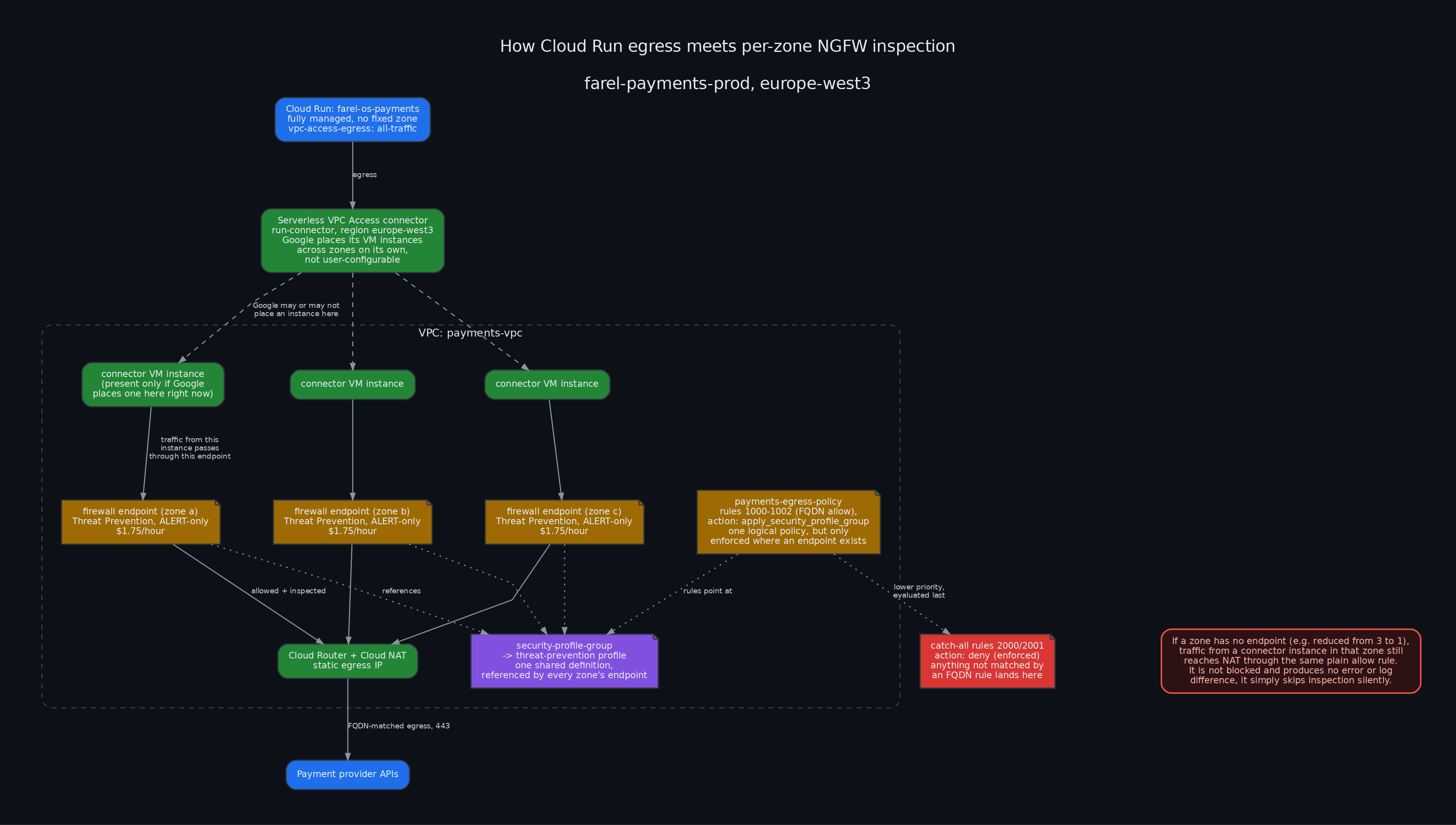
What is not built yet
- No default-deny egress rule on either environment. Enforcement is a separate, later, approved step.
- No alerting on a threat detection landing in the logs. Detections exist in Cloud Logging; nothing pages anyone yet. A daily digest, the pattern already built for the WAF above, is the wrong shape for an intrusion alert, it needs to fire close to the event, not next morning.
- Only the environment carrying live traffic has intrusion detection. The other environment got the FQDN allowlist only, deliberately, the Enterprise-tier endpoint's hourly cost was not justified there yet.
Rolling Out the Second Environment
The allowlist has two sources, not one
Both environments' FQDN allowlists cover two categories: third-party payment provider APIs, and the one container registry a background machine pulls an image from on every boot. Both categories come from the equivalent rules on the previous cloud environment's firewall, read line by line and re-evaluated for whether each one still applies.
That is a real source, but only one of two. The application also runs a background sender with its own retry queue, delivering messages to the organization's other main application, one destination host per tenant, configured per environment in the application's own deploy-time config file, not in anything infrastructure-side:
tenants:
  - schemaName: tenant-a
    url: https://tenant-a-admin.example.com/api/v1
  - schemaName: tenant-b
    url: https://tenant-b-admin.example.com/api/v1
  # eight of these in the production config, five in the other environment
None of those thirteen hostnames, eight in one environment, five in the other, existed in either allowlist. Not a failure yet, egress isn't enforced, only logged so far. It would have been the moment enforcement went live: every tenant's payment confirmation callback, in both environments, failing at once, for a reason that would not have been obvious from the callback failure alone.
No wildcard shortcut here either, the same restriction already hit once building the provider list:
FQDN objects don't support wildcard characters (*) ... because these
include only a single label.
Fixed by adding one more rule per environment, same shape as the rest, every tenant host in that environment's own config listed individually.
The actual lesson: an infrastructure allowlist built from a previous firewall's rules is a history of what used to be allowed, not a survey of what the application currently calls. Those are two different sources of truth. Only one of them got checked the first time, and it was the wrong one to treat as complete on its own.
Where enforcement actually stands
Both environments remain allow-and-log only, nothing blocks a connection yet. Two things are still outstanding before that changes:
- The container registry rule has never fired, in either environment. Nothing has rebooted the one machine whose boot script would trigger it, so the rule has never actually been exercised, only deployed.
- A single day of clean logs looked complete. It isn't enough on its own. Anything that runs weekly or monthly instead of daily stays invisible for exactly as long as the sample window is short, and finds out it was missing from the allowlist by failing for real, not by showing up in a log.
An Unexplained Address in the Catch-All
An address showing up repeatedly in the unmatched-egress catch-all, despite an FQDN rule already allowlisting the hostnames a workload is expected to call, needs identifying by elimination, not assumption.
Identifying what is actually calling it
- Check which services on the network actually use the VPC connector the traffic originates from. Not every service on a shared network has a connector attached.
- Within a service that does, check its own dependency list and source tree for any code path calling a Google API directly, a hardcoded hostname or client library import.
- Check the configuration of any sidecar or agent running alongside the service (a metrics/trace exporter, for instance) for hostnames it targets independently of the application's own code.
- Confirm a suspected hostname against the calling library's own source, not documentation or assumption:
internaloption.WithDefaultEndpoint("monitoring.googleapis.com:443"),
Ruling out a re-resolution mismatch
apply_security_profile_group both allows and inspects in one step: matched traffic is decrypted, inspected, and relayed onward by the firewall endpoint rather than forwarded directly. One candidate explanation for an address falling outside an FQDN-based allow rule despite the hostname resolving correctly: the endpoint re-resolving the destination for the relay step, a second DNS lookup separate from the one the policy used to build its FQDN-to-IP match set, disagreeing with it against a hostname resolving across a non-static address pool.
Test directly: switch the rule from apply_security_profile_group to plain allow and compare catch-all volume before and after. No change in the dominant address's volume rules out re-resolution as the cause; a real fix here would reduce or eliminate the pattern it targets.
Traffic-volume proportionality is a separate, independent check: compare the ratio of total traffic between two environments against the ratio of catch-all hits between them. A large mismatch between the two ratios (a 6x traffic difference producing a 400x difference in catch-all hits, for example) means something other than raw volume is also different.
Distinguishing one stable address from a rotating pool
Observe the address over a multi-hour window. A single fixed address, with no neighboring address ever appearing alongside it over several hours, behaves like a static single instance, not a member of a rotating anycast pool, which would show some drift over the same window.
Direct checks to run against a specific candidate address, none conclusive alone:
| Check | What it tells you |
|---|---|
Published IP range ownership (whois, the cloud provider's own IP range JSON) | Confirms the owning organization, rarely the specific product |
| TLS SNI probe with candidate hostnames | A response at the TLS layer confirms the address serves that hostname; no response across every candidate rules out the ones tried, not every possible hostname |
| Reverse DNS | Often resolves to a generic customer-facing naming pattern, not a product name |
| Intrusion detection's SNI-mismatch log (see below) | An address that is never flagged behaves like a single-purpose, non-shared address; one that is flagged names the real hostname directly |
| Application/sidecar logs during a sustained deny of the address | A genuine dependency produces an export error, connection failure, or retry once blocked; silence under an hours-long block at real volume means either the traffic tolerates failure, or its logging doesn't surface here |
Cross-referencing the threat-inspection log for hostnames outside the allowlist
The intrusion detection profile writes a separate log stream for a specific signature: a TLS handshake whose requested hostname doesn't match what the address is expected to serve. Querying that stream directly surfaces the real hostname behind any detection it has logged, useful for identifying traffic that reaches a destination successfully without being in the fixed allowlist at all. Google's shared frontend IP architecture can place multiple hostnames, some allowlisted and some not, on the same address; the non-allowlisted one keeps working purely by sharing an IP with one that is.
Pin narrow, or widen: the tradeoff
resource "google_compute_network_firewall_policy_rule" "allow_observed_ip" {
  firewall_policy = google_compute_network_firewall_policy.payments_egress.id
  priority        = 1004
  direction       = "EGRESS"
  action          = "allow"
  enable_logging  = true
  rule_name       = "allow-observed-ip"

  match {
    dest_ip_ranges = ["<observed-ip-range>"]
    layer4_configs {
      ip_protocol = "tcp"
      ports       = ["443"]
    }
  }
}
A /32 allow for one confirmed, stable address is the tightest possible rule, and the right default once an address has been confirmed stable over an observation window. It has one failure mode: it silently stops covering anything the moment the real address changes, no error, no warning, a fresh investigation needed to even notice, with a real risk of the recurrence being misread as a new, unrelated problem.
Widening to the address's full published range instead of pinning is a deliberate trade against that failure mode, not a default. It only makes sense once an address cannot be confirmed as a stable single-purpose one by the checks above, blocking it has been confirmed (by denying it and checking application/sidecar logs directly) to have no application impact, and the range itself is understood to be shared multi-tenant IP space, not exclusive to the API being allowlisted. A wide rule that is known to be wide is safer than a narrow rule that is quietly wrong, but it is a named exception to scoping firewall matches as tightly as possible, not a pattern to reach for by default.
Enforcement
Stage
Catch-all rules changed from allow to deny, same two resources as the FQDN-coverage section above, priority unchanged:
resource "google_compute_network_firewall_policy_rule" "log_unmatched_egress_ipv4" {
  # ...
  action = "deny"
  # ...
}
Applied after roughly one hour of clean observation, not the full day called out earlier in this post as the actual bar. Stage carries no live payment traffic and the change reverts in one terraform apply, accepted as a lower-risk exception to that bar, not a retraction of it.
Verification, zero denies and no application-level errors for the following 30 minutes, checked twice.
Preconfigured WAF rules need checking independently of the egress work, and propagation lags the API
A protocol_attack preconfigured Cloud Armor rule can match ordinary CR/LF bytes in a pretty-printed JSON body, false-positive territory for a legitimate webhook payload from a provider like Stripe. Confirm every preconfigured rule that isn't the specific rollout being enforced is still set to preview = true on every environment before enforcing anything else on the same policy, don't assume parity between environments just because one was already fixed.
Rebase a stale feature branch onto current master before merging, rather than merging as-is, then confirm the diff is scoped to only the file the branch's own commits touch: a regular merge of a branch many commits behind master otherwise carries forward however much drift accumulated on files the branch's commit never modified.
Cloud Armor policy changes don't propagate to every edge location instantly. The resource-level API can report a rule back in preview immediately after apply while the same request still gets the old enforced verdict at the edge for a few minutes after. Check the load balancer's own request log to see which is actually true at a given moment, jsonPayload.enforcedSecurityPolicy.outcome in the log entry, not gcloud ... describe on the resource.
Prod
Same two rules, same allow to deny change. Switching either rule's action away from apply_security_profile_group requires terraform apply -replace on that rule's address rather than a plain apply, the same constraint as the FQDN rule change earlier in this post: Terraform's in-place update sends an empty string for security_profile_group once the field is unset, which the API rejects.
This environment's own gating ticket called for at least a week of real traffic reviewed, not the shorter bar stage used. That full window didn't happen either. Checked instead, immediately before applying: zero entries in the real catch-all (not the wider query that mixes in a since-fixed rule's history, see the note above about that), and live traffic on both the payment-provider rule and the tenant-callback rule showing successful matches in the preceding several minutes. Applied on that basis, with the week-long review left incomplete and on record as incomplete, not quietly dropped.
Verified after apply the same way: no denies, provider and callback traffic still matching, no new application errors.
Alerting on What the Firewall Denies
Enforcement makes denies real, and PCI-DSS 4.0.1 has two separate requirements bearing on what to do about that: regular review of security-relevant logs (Req 10.4.1, generally read as daily, automated where possible), and prompt detection and alerting on failures of critical security control systems, firewalls and intrusion-detection named explicitly (Req 10.7). Neither requirement dictates a delivery channel. Neither is satisfied by "the data exists in Cloud Logging" on its own.
A daily digest already existed for the WAF (a different, earlier piece of this project), Cloud Scheduler triggering a Cloud Run Job that queries Cloud Armor logs and posts a summary to a Slack channel through an incoming webhook stored in Secret Manager. Same shape works for the egress firewall: a second, separate Cloud Scheduler job and Cloud Run Job, same webhook and channel, no new secret, querying deny counts and (where the environment has the inspection endpoint) threat-detection counts instead of Cloud Armor fields. Kept as a second job rather than folding into the existing one, so a mistake in the new query logic can't take down a digest that was already working.
The daily cadence covers Req 10.4.1. It does not cover Req 10.7's "promptly": a deny that happens ten minutes after the digest runs sits unseen for almost a day. For that, a log-based metric counting deny events, and a Cloud Monitoring alert policy on that metric with a short alignment window, delivered through a native email notification channel. No SMTP credentials to manage, Google's own delivery. Two mechanisms, two different requirements, deliberately not one job trying to do both.
Threat-Detection Alert (Req 11.5.1) and How to Test It
Why this is a separate metric and policy from the deny alert
The environment with the inspection endpoint produces two distinct kinds of event: an egress connection actually denied, and a threat-inspection detection, a signature match on the traffic passing through, independent of whether that traffic was denied. The inspection profile here is alert-only at every severity, so a detection can fire with nothing blocked at all. A metric that only counts denies will never see one. Threat detections need their own log-based metric and their own alert policy, scoped to the threat-inspection log, not a broadened filter on the deny metric.
Scope it to high and critical severity only
Everything below that severity belongs in the daily digest already covering the full log for review (Req 10.4.1), not in an alert channel meant for "something happened that's worth an email today" (Req 10.7 / Req 11.5.1). Filter the log-based metric to severity="HIGH" OR severity="CRITICAL" on the threat detail fields, and nothing else.
The alert condition needs its own resource.type
A Cloud Monitoring alert condition requires an explicit resource.type restriction on its filter, separate from whatever the underlying log-based metric already filters on. Get this value from a real log entry in the target stream, not by assumption, the same monitored resource type goes on the metric's filter and belongs on the alert condition's filter too.
resource "google_logging_metric" "threat_detected" {
  filter = <<-EOT
    logName="LOG_NAME"
    (jsonPayload.threatDetails.severity="HIGH" OR jsonPayload.threatDetails.severity="CRITICAL")
  EOT
  metric_descriptor {
    metric_kind = "DELTA"
    value_type  = "INT64"
  }
}

resource "google_monitoring_alert_policy" "threat_detected" {
  conditions {
    condition_threshold {
      filter          = "resource.type=\"RESOURCE_TYPE\" AND metric.type=\"logging.googleapis.com/user/${google_logging_metric.threat_detected.name}\""
      comparison      = "COMPARISON_GT"
      threshold_value = 0
      aggregations {
        alignment_period   = "86400s"
        per_series_aligner = "ALIGN_COUNT"
      }
    }
  }
  notification_channels = [google_monitoring_notification_channel.email.id]
}
Testing it
Don't wait for a real detection to find out a notification pipeline is broken. Write a synthetic log entry directly, matching both the log content and the resource type the alert filters on:
gcloud logging write LOG_NAME \
  '{"threatDetails": {"severity": "HIGH", "threat": "synthetic test entry"}}' \
  --payload-type=json \
  --severity=WARNING \
  --monitored-resource-type="RESOURCE_TYPE" \
  --monitored-resource-labels=KEY=VALUE,KEY=VALUE \
  --project=PROJECT_ID
gcloud logging write defaults to a generic resource type unless told otherwise. Set it explicitly, or the entry won't match the alert condition's filter and the test proves nothing. Confirm two things after running it: the entry appears in the log with the expected fields, and the notification actually arrives at its destination, not just that the policy exists.
Operator Reference: Inspecting WAF and NGFW by Hand
Everything below is a direct gcloud command, no console, no digest, no dashboard. PROJECT_ID is whichever environment's project. Region below is wherever the load balancer and firewall endpoint were actually deployed.
WAF (Cloud Armor)
Current rule set, and whether each rule is in preview (log-only) or enforced:
gcloud compute security-policies describe payments-waf \
  --project=PROJECT_ID --format=json \
  | python3 -c "
import json,sys
d = json.load(sys.stdin)
if isinstance(d, list): d = d[0]
for r in d.get('rules', []):
    print(r.get('priority'), 'preview=' + str(r.get('preview')), r.get('description',''))
"
Note the response is a JSON array with one object inside, not a bare object. Skipping the isinstance check above breaks on .get().
Whether a specific request was actually blocked, and by which rule, straight from the load balancer's own request log, not the policy's static config. The policy's preview flag and the LB's enforcedSecurityPolicy field can disagree for a few minutes after a policy change, Cloud Armor's edge propagation is not instant:
gcloud logging read '
resource.type="http_load_balancer"
httpRequest.requestUrl=~"SOME_PATH"
' --project=PROJECT_ID --freshness=10m --limit=5 --format=json
Fields to read in the result: jsonPayload.enforcedSecurityPolicy.outcome (what actually happened), jsonPayload.enforcedSecurityPolicy.preconfiguredExprIds (which signature), jsonPayload.statusDetails.
Daily counts without waiting for the digest:
gcloud logging read '
resource.type="http_load_balancer"
jsonPayload.enforcedSecurityPolicy.outcome="DENY"
' --project=PROJECT_ID --freshness=24h --format="value(timestamp)" | wc -l
NGFW (Cloud Firewall Policy, egress)
Live rule set, actions, and match criteria, the actual deployed state, not the Terraform source:
gcloud compute network-firewall-policies describe payments-egress-policy \
  --project=PROJECT_ID --global --format=json \
  | python3 -c "
import json,sys
d = json.load(sys.stdin)
if isinstance(d, list): d = d[0]
for r in d.get('rules', []):
    print(r.get('priority'), r.get('ruleName'), r.get('action'),
          r.get('match',{}).get('destFqdns') or r.get('match',{}).get('destIpRanges'))
"
Any egress actually denied. If nothing is enforced yet, this is always empty, that's the expected state, not a broken query:
gcloud logging read '
resource.type="gce_subnetwork"
logName="projects/PROJECT_ID/logs/compute.googleapis.com%2Ffirewall"
jsonPayload.disposition="DENIED"
' --project=PROJECT_ID --freshness=6h --limit=20 --format=json
The log name contains a literal slash, URL-encoded as %2F. A filter written with a bare slash matches nothing, no error, just an empty result indistinguishable from "no traffic."
What's landing in the unmatched-egress catch-all right now, the actual signal for whether the allowlist is complete. Priority is stored as a number but numeric comparison operators (>=) on it are unreliable in this log's filter syntax and silently returned wrong results once already, use an explicit OR of exact values instead:
gcloud logging read '
resource.type="gce_subnetwork"
logName="projects/PROJECT_ID/logs/compute.googleapis.com%2Ffirewall"
(jsonPayload.rule_details.priority=2000 OR jsonPayload.rule_details.priority=2001)
' --project=PROJECT_ID --freshness=24h --limit=10000 \
  --format="value(jsonPayload.connection.dest_ip,jsonPayload.connection.dest_port)" \
  | sort | uniq -c | sort -rn
Use a high --limit. The default is low enough to silently truncate and understate volume on a busy window.
Threat-inspection detections, environments with the endpoint only. This is the one log that captures the actual TLS SNI hostname, useful for identifying a destination the FQDN allowlist doesn't explain:
gcloud logging read '
logName="projects/PROJECT_ID/logs/networksecurity.googleapis.com%2Ffirewall_threat"
' --project=PROJECT_ID --freshness=24h --limit=500 \
  --format="value(jsonPayload.connection.serverIp,jsonPayload.threatDetails.uriOrFilename)" \
  | sort | uniq -c | sort -rn
This only captures traffic that trips a detection signature (shared-IP SNI mismatch, in practice). A destination with real traffic that never appears here isn't necessarily safe, it may just not be ambiguous enough to flag. Confirming a specific address needs a deliberate block-and-watch: flip its rule to deny, watch the dependent service's own logs for a failure, revert.
Triggering the daily digest jobs on demand
Don't wait for the scheduled run:
gcloud run jobs execute waf-daily-digest --project=PROJECT_ID --region=REGION
gcloud run jobs execute ngfw-daily-digest --project=PROJECT_ID --region=REGION
Each prints an execution URL. Confirming delivery still means checking Slack, a successful job execution and an actually-posted message are two different things, the job can complete cleanly while the webhook call inside it fails silently if the response isn't checked.
Confirming an API is actually enabled
Belongs here rather than assumed from the Terraform file, a resource can be defined and never applied:
gcloud services list --project=PROJECT_ID --filter="name:SERVICE_NAME" --format="value(name,state)"
Notes on a Perimeter Not Yet Built
Not implemented yet, written down here to pick up later rather than re-derive it from scratch.
What this actually restricts, that IAM and firewalls don't
A VPC Service Controls perimeter is a third layer of access control, separate from IAM (who is allowed to call an API) and firewalls (what network traffic is allowed to flow). It restricts which API calls can succeed based on where the caller sits relative to a defined perimeter, even for a caller with fully valid IAM permissions. Its actual job: stop someone who already has legitimate credentials to two different projects from moving data across the boundary between them, a secret copied out, a database export sent somewhere it shouldn't go. It is specifically about that failure mode, not about network-level attacks, which firewalls already cover.
The gap this closes
Isolation from the general-purpose environment already exists, but only by omission: no shared VPC, no shared IAM between the payments projects and everything else. That prevents accidental connection. It does not prevent someone who happens to hold valid access to both a payments resource and an unrelated project from exfiltrating data through ordinary, permitted API calls, nothing currently stops that specific path. A perimeter is what actually closes it, defense in depth against a compromised or misused credential, not a response to anything currently exploited.
What building it actually involves
- An org-level access policy. This is a singleton per Google Cloud organization. If one doesn't exist yet, creating it is step zero, and needs org-level IAM, likely beyond what the project-scoped Terraform service accounts already in use can do on their own.
- A service perimeter wrapping both environments, naming which APIs are restricted, Cloud SQL Admin, Secret Manager, Storage, at minimum.
- Explicit ingress rules for everything that currently reaches in from outside Google Cloud's own network entirely: CI via workload identity federation, an interactive
gcloud auth loginsession tunneling in through IAP. A perimeter has no default awareness of either. Each needs its own access level or ingress rule, or it silently breaks the moment enforcement turns on.
The actual risk
This is a well-documented way to lock yourself out of your own infrastructure if it's misconfigured: CI/CD breaks, an operator's own gcloud access breaks, the application's own calls to its own secrets break, all at once, all silently, until enforcement is live and something fails. Google Cloud ships a dry-run mode for exactly this reason: deploy the perimeter logging violations without enforcing anything, watch a real observation window, fix whatever legitimate traffic the log turns up, only then switch to enforced.
That's the same allow, observe, enforce shape already used twice elsewhere in this project, a WAF policy reverted to preview and re-enforced once traffic was reviewed, an egress firewall run allow-and-log before flipping to default-deny. Different mechanism, same proven method. Worth starting from that playbook instead of improvising a new one.